Forum Discussion

Grouping and Dates Formula
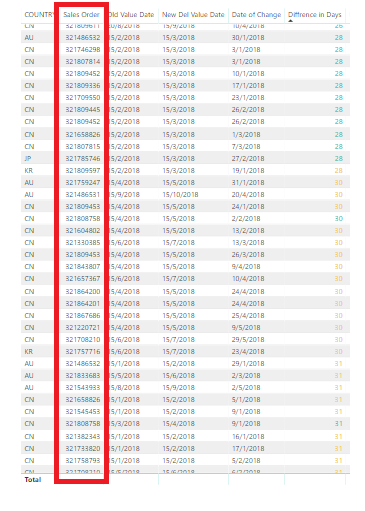
I have a set of table with repeated SO numbers.
Can someone assit me in grouping the SO numbers together in the table with borders, so I can see how many repeated times per SO number. Shown below screenshot. You may provide steps or screenshot.
From the table above, I am using search filter to drill down my SO numbers. Can someone help me to formulate the DAX code/custom collumn to measure Latest.(Date of Change) for (New Del Value Date )- Earliest.(Date of Change) for (Old Value Date)
So the result should be number of days= 15 Sept 2018 - 15 June 2018 = 92 Days
Hi Anonymous,
I modify the old formula. Please try it again.
Result =
VAR minChangeDate =
    CALCULATE ( MIN ( 'Table'[Date of Change] ), ALL ( 'Table' ) )
VAR maxChangeDate =
    CALCULATE ( MAX ( 'Table'[Date of Change] ), ALL ( 'Table' ) )
RETURN
    DATEDIFF (
        CALCULATE (
            MIN ( 'table'[Old Value Date] ),
            FILTER ( ALL ( 'Table' ), 'Table'[Date of Change] = minChangeDate )
        ),
        CALCULATE (
            MAX ( 'table'[New Del Value Date] ),
            FILTER ( ALL ( 'Table' ), 'Table'[Date of Change] = maxChangeDate )
        ),
        DAY
    )
About grouping:
grouping =
SUMX (
    SUMMARIZE (
        'Table',
        'Table'[Sales Order],
        [Old Value Date],
        [New Del Value Date],
        [Date of Change],
        "Value", [Result]
    ),
    [Value]
)
Best Regards,
Dale
11 Replies
 v-jiascu-msft
Microsoft Employee
Hi Anonymous,
Try this formula please.
Result =
CALCULATE (
    DATEDIFF (
        MIN ( 'table'[Old Value Date] ),
        MAX ( 'table'[New Del Value Date] ),
        DAY
    ),
    ALLEXCEPT ( 'table', 'table'[Sales Order] )
)
Best Regards,
Dale
- AnonymousNot applicable
@ v-jiascu-msft
Thank you for replying.
However, the formula returns me the value of 122 days, which is incorrect.
92 days should be the answer.
Besides, can you help me in grouping the SO numbers in table ?
So I can see how many repeated times per SO number. Shown below screenshot. You may provide steps or screenshot.
- v-jiascu-msft
Hi Anonymous,
Can you share the data in TEXT mode or share the file? It's a hard work to type so many words.
1. Can you post a snapshot? It should work in the table visual of the second snapshot of your first post.
2. What the format of table do you expect? Maybe you can try the following formula.
Table =
SUMMARIZE (
    'salestable',
    'salestable'[Sales Order],
    "Times", COUNT ( 'salestable'[Sales Order] )
)
Best Regards,
Dale