Join us at FabCon Atlanta from March 16 - 20, 2026, for the ultimate Fabric, Power BI, AI and SQL community-led event. Save $200 with code FABCOMM.
Register now!The Power BI Data Visualization World Championships is back! Get ahead of the game and start preparing now! Learn more
Hello. I am fairly new to Power Bi and am struggling with how to do this. I would like to group a list of values for a customer based on a field in my table. If the table shows the customer has every value, I would like to show a 1; otherwise show a 0.
EX: Customer ID Value
1 Dog
1 Cat
1 Bird
1 Rabbit
Solved! Go to Solution.
I found a solution by creating a measure using the Calculate, Count and Filter functions:
TestID = IF (CALCULATE(
COUNT(Query2[ID]),
FILTER(
Query2,
Query2[BadgeName] = "Test East" ||
Query2[BadgeName] = "BB" ||
Query2[BadgeName] = "MD" ||
Query2[BadgeName] = "NEP" ||
Query2[BadgeName] = "NJ"
)
) = 5,1,0)
Hi @Anonymous ,
>>If the table shows the customer has every value, I would like to show a 1; otherwise show a 0.
I am not sure what desired result would you want, could you please share your sample data and desired output screenshots for further analysis? You can also upload sample pbix to OneDrive and post the link here. Do mask sensitive data before uploading.
Please read this post to get your answer quickly: How to Get Your Question Answered Quickly.
Best Regards,
Amy
Here is the column I created: TestID = IF(([BadgeName]="Test East" && [BadgeName] IN {"Test East","BB","MD","NEP","NJ"}),1,0)
Here is the outputPROBLEM: 1111997 is showing a 1 because it matches 1 of the values in the IN statement. It should show a 0 because it doesn't match ALL of the values in the IN statement. How can I fix this? Thanks!
I found a solution by creating a measure using the Calculate, Count and Filter functions:
TestID = IF (CALCULATE(
COUNT(Query2[ID]),
FILTER(
Query2,
Query2[BadgeName] = "Test East" ||
Query2[BadgeName] = "BB" ||
Query2[BadgeName] = "MD" ||
Query2[BadgeName] = "NEP" ||
Query2[BadgeName] = "NJ"
)
) = 5,1,0)
Hi @Anonymous
Here is my table.
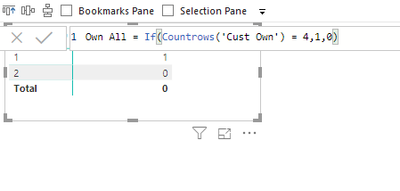
Create a measure, place it on a matrix that has the list of customers as follows. The picture has the measure as well. Cust 1 owns all Cust 2 does not.
The table is Cust Own
If this solves your issue, please mark this as the solution. Kudos are nice too!
Proud to be a Super User!
The Power BI Data Visualization World Championships is back! Get ahead of the game and start preparing now!
| User | Count |
|---|---|
| 39 | |
| 39 | |
| 37 | |
| 29 | |
| 24 |
| User | Count |
|---|---|
| 120 | |
| 95 | |
| 70 | |
| 69 | |
| 65 |