Don't miss your chance to take the Fabric Data Engineer (DP-600) exam for FREE! Find out how by attending the DP-600 session on April 23rd (pacific time), live or on-demand.
Learn moreNext up in the FabCon + SQLCon recap series: The roadmap for Microsoft SQL and Maximizing Developer experiences in Fabric. All sessions are available on-demand after the live show. Register now
Hi,
I have column 1 (Start Date) and column 2 (End Date). I wrote a new measure to calculate End Date (minus) Start Date and based on the result (number of weeks), I have categorized them as 0-1 Week, 1-2 Weeks, 2-3 Weeks and so on. This part is working fine.
Now in a separate report, I want to group the newly calculated measure and find the number of records for each category. I then want the results to look like:
| Category (new measure) | Count of Services (Records) |
| 0-1 Week | 50 |
| 1-2 Weeks | 60 |
| 2-3 Weeks | 70 |
| 3-4 Weeks | 60 |
| > 4 Weeks | 60 |
However, when I drag the new measure I only see the first value 0-1 week and not the remaining values since this is a measure and doesn't look at row by row details. Anyway we can show the above result? Any help is greatly appreciated!
I realize that doing the same process using a calculated column would be straight forward. But I specifically want to try and see if I can do this using a measure.
Hi vbaskar,
According to your description, my understanding is that you want to group the measure result. Please refer to the following sample:
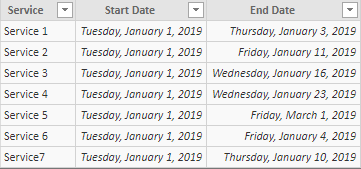
I have a table like this:
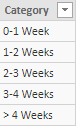
Then I create a table used to display the Category:
After that, we can create a measure like below:
Count of Service = var a = ADDCOLUMNS(Data, "weeks", SWITCH(DATEDIFF(Data[Start Date],Data[End Date],WEEK),0,"0-1 Week",1,"1-2 Weeks",2,"2-3 Weeks",3,"3-4 Weeks","> 4 Weeks")) return SUMX(a,IF([weeks] = MIN(Category[Category]),1,0))
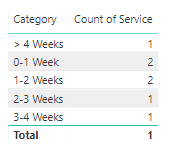
Then drag the measure and the ‘category’[category] to the table visual, the result will like below:
Best Regards,
Teige
Thanks, @TeigeGao! That's exactly what I wanted to do.
By any chance, can you bring about this solution without creating a new table to display the category? We will be giving PowerBI datasets access to different teams within my company and I'd like to encourage them to write their own measures without doing a calculated column or a new table. I can add a table on the backend this time, but going forward if anyone wants to create a new measure and then group it, I am looking to see if there is a way. Thanks again for your help.
If you have recently started exploring Fabric, we'd love to hear how it's going. Your feedback can help with product improvements.
A new Power BI DataViz World Championship is coming this June! Don't miss out on submitting your entry.
Share feedback directly with Fabric product managers, participate in targeted research studies and influence the Fabric roadmap.
| User | Count |
|---|---|
| 44 | |
| 43 | |
| 38 | |
| 18 | |
| 16 |
| User | Count |
|---|---|
| 67 | |
| 63 | |
| 30 | |
| 30 | |
| 23 |