
cancel
Showing results for 
Search instead for 
Did you mean: 

The FabCon + SQLCon recap series starts April 14th at 8am Pacific. If you’re tracking where AI is going inside Fabric, this first session is a can't miss. Register now

Reply
saumitra
Helper I
Helper I

Grouping Measures

Hi Everyone, 


I have a Revenue, Projections and Targets table, for which I have created 3 simple DAX Measures. 


1. Revenue = sum(Revenue [invoice_amount])/10^5

2. Target = sum(Targets [target])/10^5

3. Projections = sum(Projections [projections])/10^5


I would like to club these into a group say - PAT, wherein I can drill up or drill down as required. 


Currently my headers look this way: 


saumitra_0-1662102606589.png


However, I would want it to be like a +/- situation, where I can hide the measures if I click on the minus sign or show measures if I click on + sign. 


The idea is to be able to show and hide as required.


Is there any way this can be done?


Any ideas would be appreciated.


Regards,

Saumitra

1 ACCEPTED SOLUTION

@saumitra , Please explore field parameters or calculation groups


https://amitchandak.medium.com/power-bi-field-parameters-a-quick-way-for-dynamic-visuals-fc4095ae9af...


Calculation Groups- Measure Slicer, Measure Header Grouping, Measure to dimension conversion. Complex Table display : https://youtu.be/qMNv67P8Go0

Share with Power BI Enthusiasts: Full Power BI Video (20 Hours) YouTube
Microsoft Fabric Series 60+ Videos YouTube
Microsoft Fabric Hindi End to End YouTube

View solution in original post

6 REPLIES 6
Anonymous
Not applicable

Hi,

I think this similar thread is discussing the solution you are looking for: 
https://community.powerbi.com/t5/Desktop/Slicer-to-hide-or-unhide-measures-in-a-line-chart/m-p/11473...


Hi,


I couldn't understand how it will show all 3 measures together if nothing is selected? Kindly please explain. Thanks! 

@saumitra , Please explore field parameters or calculation groups


https://amitchandak.medium.com/power-bi-field-parameters-a-quick-way-for-dynamic-visuals-fc4095ae9af...


Calculation Groups- Measure Slicer, Measure Header Grouping, Measure to dimension conversion. Complex Table display : https://youtu.be/qMNv67P8Go0

Share with Power BI Enthusiasts: Full Power BI Video (20 Hours) YouTube
Microsoft Fabric Series 60+ Videos YouTube
Microsoft Fabric Hindi End to End YouTube

Hi @amitchandak , I saw the video that you have shared. Great video. I was able to get the slicer measure as I required. 


However, in the video you have also grouped Net and Net Target together under "Actuals" and "Target". But in my case, I have Actuals, Targets and Projections. How do you suggest I should add all three into the DAX that you have created? 


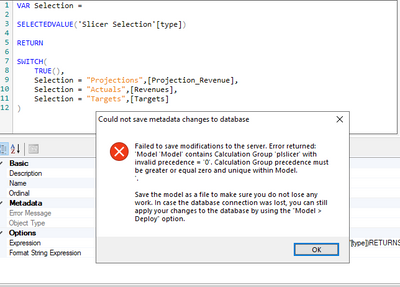
I tried using the following DAX but it is throwing an error, which I couldn't understand. Kindly please explain. 


saumitra_0-1662114337520.png


@amitchandak It is not throwing the above error now. It may be because I had copied the Calculation Group like you had, so something must have caused the error. 


However, what dax needs to be written in case you have more than 2 categories? I tried the above dax but it doesn't work. Nor does the max function. Kindly help. Thanks.  

I rewatched your video and tried again. It works now. Thanks @amitchandak !

Helpful resources

Announcements
New to Fabric survey Carousel

New to Fabric Survey

If you have recently started exploring Fabric, we'd love to hear how it's going. Your feedback can help with product improvements.

Power BI DataViz World Championships carousel

Power BI DataViz World Championships - June 2026

A new Power BI DataViz World Championship is coming this June! Don't miss out on submitting your entry.

Join our Fabric User Panel

Join our Fabric User Panel

Share feedback directly with Fabric product managers, participate in targeted research studies and influence the Fabric roadmap.

March Power BI Update Carousel

Power BI Community Update - March 2026

Check out the March 2026 Power BI update to learn about new features.