This time we’re going bigger than ever. Fabric, Power BI, SQL, AI and more. We're covering it all. You won't want to miss it.
Learn moreLevel up your Power BI skills this month - build one visual each week and tell better stories with data! Get started
I'm wondering how to group data based on two columns. I want to create flashcards and when we click the the list (ColumnA) it should show all the data pertaining to that value from (ColumnB).
| 1 | A |
| 1 | B |
| 1 | C |
| 1 | F |
| 1 | G |
| 1 | H |
| 1 | T |
| 2 | A |
| 2 | B |
| 2 | C |
| 2 | D |
| 3 | G |
| 3 | H |
| 3 | T |
| 3 | A |
| 3 | B |
How do i do that?
Solved! Go to Solution.
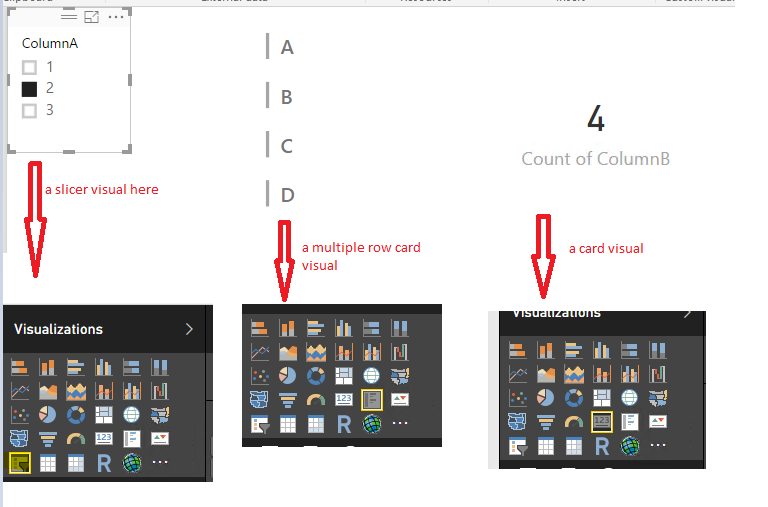
I think you can use a slicer visual, a multiple-row visual and a card visual to achieve your goal. See the demo in the attached pbix file.
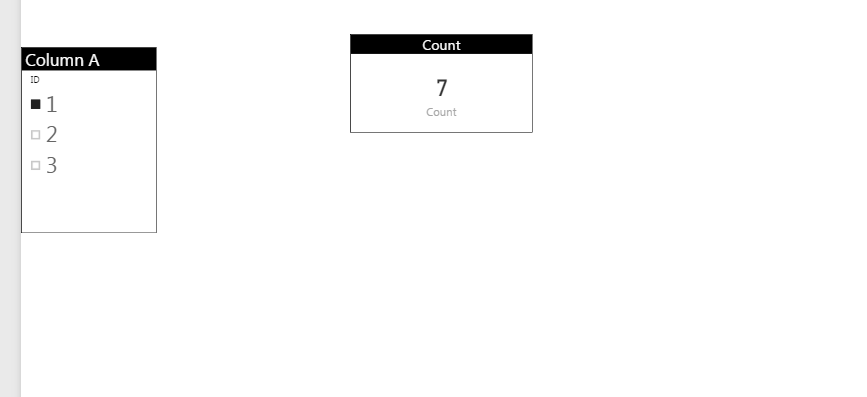
@drallam Go to Query ediotor and do Group by column A then you will get the count please check below image
@drallamJust be clear do you want the count of column B in card by selecting list containg column A ??
I want the actual description.
I think you can use a slicer visual, a multiple-row visual and a card visual to achieve your goal. See the demo in the attached pbix file.
Check out the April 2026 Power BI update to learn about new features.
Sign up to receive a private message when registration opens and key events begin.
If you have recently started exploring Fabric, we'd love to hear how it's going. Your feedback can help with product improvements.
| User | Count |
|---|---|
| 36 | |
| 29 | |
| 29 | |
| 21 | |
| 18 |
| User | Count |
|---|---|
| 71 | |
| 45 | |
| 33 | |
| 24 | |
| 23 |