Join us at FabCon Atlanta from March 16 - 20, 2026, for the ultimate Fabric, Power BI, AI and SQL community-led event. Save $200 with code FABCOMM.
Register now!Vote for your favorite vizzies from the Power BI Dataviz World Championship submissions. Vote now!
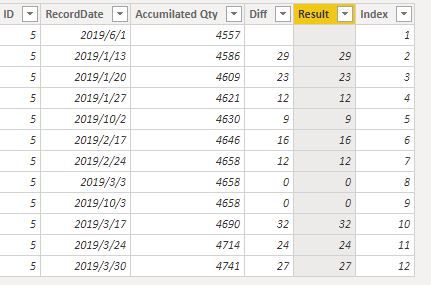
I have the data below and was wondering how to calculate the diff column which is previous qty minus current row quantitiy while ensuring ID is the same. Many thanks!
| ID | RecordDate | Accumilated Qty | Diff |
| 5 | 06/01/2019 | 4557 | |
| 5 | 13/01/2019 | 4586 | 29 |
| 5 | 20/01/2019 | 4609 | 23 |
| 5 | 27/01/2019 | 4621 | 12 |
| 5 | 10/02/2019 | 4630 | 9 |
| 5 | 17/02/2019 | 4646 | 16 |
| 5 | 24/02/2019 | 4658 | 12 |
| 5 | 03/03/2019 | 4658 | 0 |
| 5 | 10/03/2019 | 4658 | 0 |
| 5 | 17/03/2019 | 4690 | 32 |
| 5 | 24/03/2019 | 4714 | 24 |
| 5 | 30/03/2019 | 4741 | 27 |
Hi,
I suggest you to create an Index column, this can make it very simple with the following formula:
Result =
VAR current_ = [Index]
RETURN
IF (
Sheet1[Index] <> 1,
[Accumilated Qty]
- CALCULATE (
MAX ( [Accumilated Qty] ),
FILTER ( Sheet1, Sheet1[Index] = current_ - 1 ),
FILTER ( Sheet1, Sheet1[Index] <> 0 )
),
BLANK ()
)
Best,
Paul
If this post helps, then please consider Accept it as the solution to help the other members find it more quickly.
@Anonymous this looks like exactly what I'm looking for. Ill try it out when i get the chance and report back/accept as soution. Many Thanks!
edit. Actually, this wouldnt work if I had an id of 4 in the same dataset as the id of 5 would it?
@Matt_P
This formula is created by looking at the the index column, so it does not matter if your ID is 4 or 5.
Just leave a message for any updates if needed.
Best,
See my article on Mean Time Between Failure (MTBF) which uses EARLIER: http://community.powerbi.com/t5/Community-Blog/Mean-Time-Between-Failure-MTBF-and-Power-BI/ba-p/3395...
Thanks, looked at EARLIER but im finding it difficult to apply... hence the post. 😁
Vote for your favorite vizzies from the Power BI World Championship submissions!
If you love stickers, then you will definitely want to check out our Community Sticker Challenge!
Check out the January 2026 Power BI update to learn about new features.
| User | Count |
|---|---|
| 65 | |
| 52 | |
| 45 | |
| 23 | |
| 21 |
| User | Count |
|---|---|
| 141 | |
| 114 | |
| 50 | |
| 37 | |
| 30 |