Join us at FabCon Atlanta from March 16 - 20, 2026, for the ultimate Fabric, Power BI, AI and SQL community-led event. Save $200 with code FABCOMM.
Register now!The Power BI Data Visualization World Championships is back! Get ahead of the game and start preparing now! Learn more
Hi everyone,
New to Power BI. Simple task but cant seem to figure out which function/s needs to be applied. Pretty sure I need to create a calculated measure to achieve this.
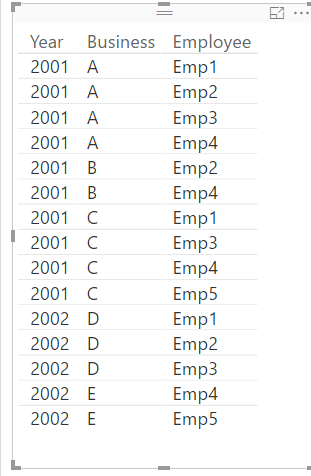
I have a data set with the following normalized column data;
years. 1985, 1990, 1992, 1991, 2000, 2000, 2001 etc.business
business name; various business names
employee; employee names for associated business
Question to answer: create a tab/graph which shows per year for every business with less than 10 staff
I can figure out the number of companies with less than 10 but dont know how to filter/summarize based on year.
Output should look like this.
Year Count
2000 5
2001 20
2002 14
2003 32
etc
Thanks
Solved! Go to Solution.
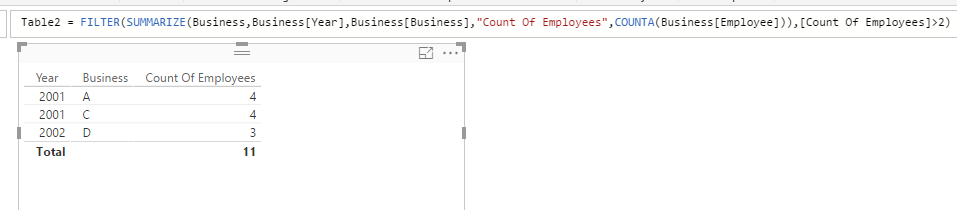
In this scenario, you need to create a calculated table to filter the Business with more that 10 Employees.
Table =
FILTER (
SUMMARIZE (
Business,
Business[Year],
Business[Business],
"Count Of Employees", COUNTA ( Business[Employee] )
),
[Count Of Employees] > 10
)
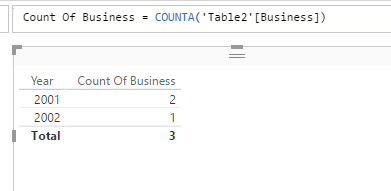
Then create a measure in new calculated table to calculate the count of business.
Count Of Business = COUNTA('Table'[Business])
Drag Year and above measure into a table visual will get your expected result.
See my sample below:
Regards,
In this scenario, you need to create a calculated table to filter the Business with more that 10 Employees.
Table =
FILTER (
SUMMARIZE (
Business,
Business[Year],
Business[Business],
"Count Of Employees", COUNTA ( Business[Employee] )
),
[Count Of Employees] > 10
)
Then create a measure in new calculated table to calculate the count of business.
Count Of Business = COUNTA('Table'[Business])
Drag Year and above measure into a table visual will get your expected result.
See my sample below:
Regards,
I don't think i fully understood your issue. However if you want to create a new table with Year, business name and employee. you can use Summarize function and create a new table.
https://msdn.microsoft.com/en-us/library/gg492171.aspx
SUMMARIZE(<table>, <groupBy_columnName>[, <groupBy_columnName>]…[, <name>, <expression>]…)
The Power BI Data Visualization World Championships is back! Get ahead of the game and start preparing now!
| User | Count |
|---|---|
| 39 | |
| 37 | |
| 33 | |
| 32 | |
| 29 |
| User | Count |
|---|---|
| 132 | |
| 86 | |
| 85 | |
| 68 | |
| 64 |