cancel
Showing results for 
Search instead for 
Did you mean: 

The Power BI Data Visualization World Championships is back! Get ahead of the game and start preparing now! Learn more

Reply
mikesdunbar
Helper I
Helper I

Group data by start and end date

I want to be able to measure (avg, sum, high, low) values (dollars, hours) based on a start and end date. I have two tables:


Raw Data [Table 1]

DatePersonHoursSales
1/5/2023Joe201000
2/5/2023Joe151500
3/5/2023Joe152000
4/5/2023Joe253000
5/5/2023Joe201000
6/5/2023Joe155000
1/5/2023Mary201000
2/5/2023Mary151500
3/5/2023Mary152000
4/5/2023Mary253000
5/5/2023Mary201000
6/5/2023Mary155000


Phase Dates [Table 2]

PhaseStartEnd
Phase 11/1/20232/28/2023
Phase 23/1/20234/30/2023
Phase 35/1/20236/30/2023


I'd like to have a table where I can have all the hours and sales summed per phase. Something like this:


PhaseHoursSales
Phase 1705000
Phase 28010000
Phase 37012000


It would also be nice to have those phases in a slicer to filter other data too. 


Thanks!

1 ACCEPTED SOLUTION
amitchandak
Super User
Super User

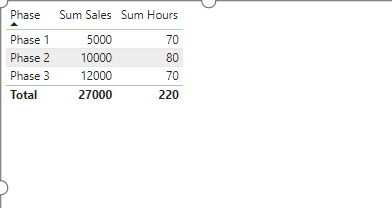
@mikesdunbar , You can try a measure like


Sum Sales = Sumx('Table 2', Sumx(FILTER('Table 1', 'Table 1'[Date] >= 'Table 2'[Start] && 'Table 1'[Date] <= 'Table 2'[End]), 'Table 1'[Sales]))

Sum Hours = Sumx('Table 2', Sumx(FILTER('Table 1', 'Table 1'[Date] >= 'Table 2'[Start] && 'Table 1'[Date] <= 'Table 2'[End]), 'Table 1'[Hours]))


amitchandak_0-1705116273510.png


Share with Power BI Enthusiasts: Full Power BI Video (20 Hours) YouTube
Microsoft Fabric Series 60+ Videos YouTube
Microsoft Fabric Hindi End to End YouTube

View solution in original post

4 REPLIES 4
Ashish_Mathur
Super User
Super User

Hi,

How did you arrive at the sales and hours figures in the third table?


Regards,
Ashish Mathur
http://www.ashishmathur.com
https://www.linkedin.com/in/excelenthusiasts/

Hi Ashish,

I realize now that the tables are hard to make out without borders between cells. Table 2 lists all the Phases and their respective start and finish dates e.g. Phase 1 starts 1/1/2023 and finishes 2/28/2023. That final table sums the hours and sales based on the date range. 


On the subject of unclear tables, do you know how I could add borders? The tables were inserted here and I tried to do advanced table properties and it didn't do anything. 

amitchandak
Super User
Super User

@mikesdunbar , You can try a measure like


Sum Sales = Sumx('Table 2', Sumx(FILTER('Table 1', 'Table 1'[Date] >= 'Table 2'[Start] && 'Table 1'[Date] <= 'Table 2'[End]), 'Table 1'[Sales]))

Sum Hours = Sumx('Table 2', Sumx(FILTER('Table 1', 'Table 1'[Date] >= 'Table 2'[Start] && 'Table 1'[Date] <= 'Table 2'[End]), 'Table 1'[Hours]))


amitchandak_0-1705116273510.png


Share with Power BI Enthusiasts: Full Power BI Video (20 Hours) YouTube
Microsoft Fabric Series 60+ Videos YouTube
Microsoft Fabric Hindi End to End YouTube

That did it, thank you!

Helpful resources

Announcements
Power BI DataViz World Championships

Power BI Dataviz World Championships

The Power BI Data Visualization World Championships is back! Get ahead of the game and start preparing now!

November Power BI Update Carousel

Power BI Monthly Update - November 2025

Check out the November 2025 Power BI update to learn about new features.

FabCon Atlanta 2026 carousel

FabCon Atlanta 2026

Join us at FabCon Atlanta, March 16-20, for the ultimate Fabric, Power BI, AI and SQL community-led event. Save $200 with code FABCOMM.