cancel
Showing results for 
Search instead for 
Did you mean: 

The Power BI Data Visualization World Championships is back! Get ahead of the game and start preparing now! Learn more

Reply
ShootingBlanks
New Member

Group column values, get a total/count of each one, then visualize in a pie chart

Hello.  I'm new to Power BI, so this may be a basic question (although I have googled around and checked the forum before making this post)...


I have a column of data with four values - let's call them V1, V2, V3, and V4.  So, the column may look like:

V1

V4

V2

V1

V2

V3

V1

V1


I just want to get the percentage of the appearance of each of those put into a pie chart.  So, in the example above, there would be a pie chart with V1 taking up 50% (4/8 entries), V2 taking up 25% (2/8 entries), and V3/V4 taking up 12.5% each (1/8 entries each).


I've only used the WYSIWYG interface of Power BI and haven't messed with scripting yet, but I do have a programming background, so if that is what this solution involves, that should be fine.  Thanks!

1 ACCEPTED SOLUTION
Vvelarde
Community Champion
Community Champion

@ShootingBlanks


Hi my friend. 


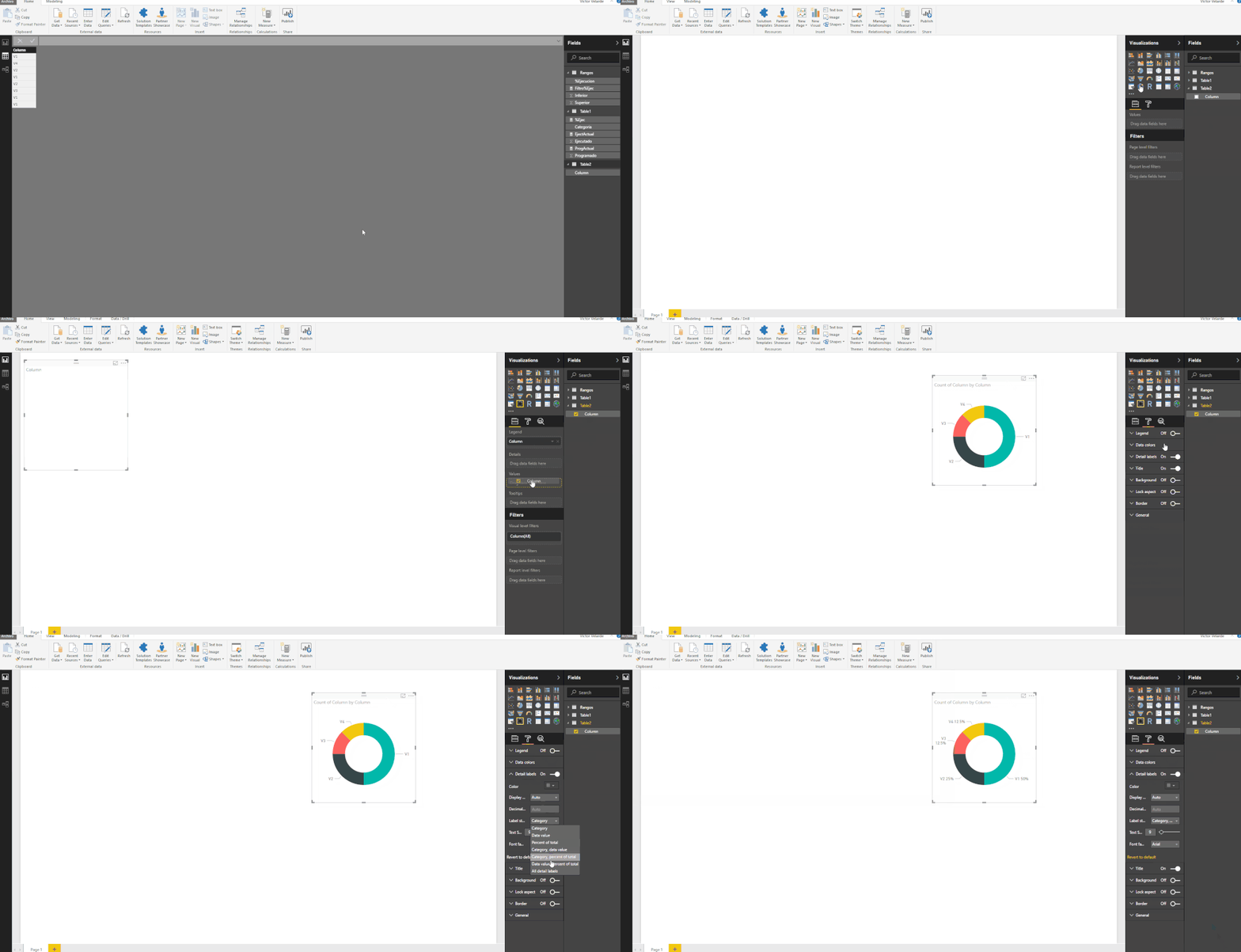
Please follow the steps showed in the below image.


Pie.gif


Victor Velarde

Lima-Peru


Lima - Peru

View solution in original post

3 REPLIES 3
MFelix
Super User
Super User

Hi @ShootingBlanks,

If you want this in a PieChart just add the column with the V1, V2 and so on to the values of the pie chart and choose option count and also add that column to the legend and that will give the expect result and then.in the options you can choose if.you show values percents in the labels.

Regards,MFelix

Regards

Miguel Félix


Did I answer your question? Mark my post as a solution!

Proud to be a Super User!

Check out my blog: Power BI em Português


Vvelarde
Community Champion
Community Champion

@ShootingBlanks


Hi my friend. 


Please follow the steps showed in the below image.


Pie.gif


Victor Velarde

Lima-Peru


Lima - Peru

@Vvelarde


Thank you for probably the quickest and most comprehensive/visual/easy-to-understand accurate response I've ever received on a support forum...very much appreciated! Smiley Very Happy

Helpful resources

Announcements
November Power BI Update Carousel

Power BI Monthly Update - November 2025

Check out the November 2025 Power BI update to learn about new features.

Fabric Data Days Carousel

Fabric Data Days

Advance your Data & AI career with 50 days of live learning, contests, hands-on challenges, study groups & certifications and more!

FabCon Atlanta 2026 carousel

FabCon Atlanta 2026

Join us at FabCon Atlanta, March 16-20, for the ultimate Fabric, Power BI, AI and SQL community-led event. Save $200 with code FABCOMM.

Top Solution Authors
Top Kudoed Authors