FabCon is coming to Atlanta
Join us at FabCon Atlanta from March 16 - 20, 2026, for the ultimate Fabric, Power BI, AI and SQL community-led event. Save $200 with code FABCOMM.
Register now!- Power BI forums
- Get Help with Power BI
- Desktop
- Service
- Report Server
- Power Query
- Mobile Apps
- Developer
- DAX Commands and Tips
- Custom Visuals Development Discussion
- Health and Life Sciences
- Power BI Spanish forums
- Translated Spanish Desktop
- Training and Consulting
- Instructor Led Training
- Dashboard in a Day for Women, by Women
- Galleries
- Data Stories Gallery
- Themes Gallery
- Contests Gallery
- QuickViz Gallery
- Quick Measures Gallery
- Visual Calculations Gallery
- Notebook Gallery
- Translytical Task Flow Gallery
- TMDL Gallery
- R Script Showcase
- Webinars and Video Gallery
- Ideas
- Custom Visuals Ideas (read-only)
- Issues
- Issues
- Events
- Upcoming Events
The Power BI Data Visualization World Championships is back! Get ahead of the game and start preparing now! Learn more
- Power BI forums
- Forums
- Get Help with Power BI
- Desktop
- Re: Group before calculating the Quartiles
- Subscribe to RSS Feed
- Mark Topic as New
- Mark Topic as Read
- Float this Topic for Current User
- Bookmark
- Subscribe
- Printer Friendly Page

- Mark as New
- Bookmark
- Subscribe
- Mute
- Subscribe to RSS Feed
- Permalink
- Report Inappropriate Content
Group before calculating the Quartiles
Hello,
I am looking to group my data by one of the columns and then calculate the IQR of a corresponding column. The goal will be to find Q1 and Q3 values for each group then use this to filter outliers in the dataset.
To return the q1 for each group I tried
Q1 = SUMMARIZE(Table1,[groupedColumn],"q1", PERCENTILE.INC(Table1[valueColumn], 0.25))
and recieved the error:
'The expression refers to multiple columns. Multiple columns cannot be converted to a scalar value.'
The end goal will be to Filter all values < Q1-(IQR * 1.5) and > Q3 + (IQR * 1.5)
Any help would be greatly appreciated. Thanks in advance!
Solved! Go to Solution.


- Mark as New
- Bookmark
- Subscribe
- Mute
- Subscribe to RSS Feed
- Permalink
- Report Inappropriate Content
Hey,
I'm sorry for the delay, and I'm also sorry for mentioning it would be become a little more complex ... At least not now.
I created a little pbix file, and I used the same the formula like you do, except a minor issue. Here is my formula
summarize to percentile =
    SUMMARIZE('samplePercentile','samplePercentile'[GroupColumn],"p", PERCENTILE.INC('samplePercentile'[Value],0.25)
    )
And all works well, I also tried the formula on a real-life dataset, the same result, working well ...
I'm wondering if your [groupedcolumn] is a measure or column in Table1
So, I guess you have to share your data, being able to reproduce your issue (at least trying).
By the way, what version of Power BI Desktop are you using.
I'm using the latest July update: 2.48.4792.721
Regards
Did I answer your question? Mark my post as a solution, this will help others!
Proud to be a Super User!
I accept Kudos 😉
Hamburg, Germany
- Mark as New
- Bookmark
- Subscribe
- Mute
- Subscribe to RSS Feed
- Permalink
- Report Inappropriate Content
Hey,
can you please provide some sample data how your data in the table Table1 looks like?
Cheers
Did I answer your question? Mark my post as a solution, this will help others!
Proud to be a Super User!
I accept Kudos 😉
Hamburg, Germany
- Mark as New
- Bookmark
- Subscribe
- Mute
- Subscribe to RSS Feed
- Permalink
- Report Inappropriate Content
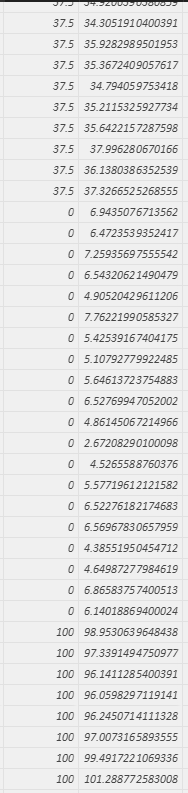
Some sample data can be seen here, with the groups in the column on the left and the values on the right
Thanks!
- Mark as New
- Bookmark
- Subscribe
- Mute
- Subscribe to RSS Feed
- Permalink
- Report Inappropriate Content
Ah,
I see ...
This will become a little more complex, currently I'm in a hurry. So it will take ~ 1.5 I will post again 😉
Did I answer your question? Mark my post as a solution, this will help others!
Proud to be a Super User!
I accept Kudos 😉
Hamburg, Germany
- Mark as New
- Bookmark
- Subscribe
- Mute
- Subscribe to RSS Feed
- Permalink
- Report Inappropriate Content
Hey,
I'm sorry for the delay, and I'm also sorry for mentioning it would be become a little more complex ... At least not now.
I created a little pbix file, and I used the same the formula like you do, except a minor issue. Here is my formula
summarize to percentile =
    SUMMARIZE('samplePercentile','samplePercentile'[GroupColumn],"p", PERCENTILE.INC('samplePercentile'[Value],0.25)
    )
And all works well, I also tried the formula on a real-life dataset, the same result, working well ...
I'm wondering if your [groupedcolumn] is a measure or column in Table1
So, I guess you have to share your data, being able to reproduce your issue (at least trying).
By the way, what version of Power BI Desktop are you using.
I'm using the latest July update: 2.48.4792.721
Regards
Did I answer your question? Mark my post as a solution, this will help others!
Proud to be a Super User!
I accept Kudos 😉
Hamburg, Germany

- Mark as New
- Bookmark
- Subscribe
- Mute
- Subscribe to RSS Feed
- Permalink
- Report Inappropriate Content
Hi @TomMartens , what's the difference if it was a measure or column in a table? I think I'm encountering the same thing, but in my case, I need to rely on another measure. Unable to see the pbix file now as its been removed. Appreciate any replies!
- Mark as New
- Bookmark
- Subscribe
- Mute
- Subscribe to RSS Feed
- Permalink
- Report Inappropriate Content
It's working now. Thanks!

Helpful resources

Power BI Dataviz World Championships
The Power BI Data Visualization World Championships is back! Get ahead of the game and start preparing now!

Power BI Monthly Update - December 2025
Check out the December 2025 Power BI Holiday Recap!

FabCon Atlanta 2026
Join us at FabCon Atlanta, March 16-20, for the ultimate Fabric, Power BI, AI and SQL community-led event. Save $200 with code FABCOMM.

| User | Count |
|---|---|
| 38 | |
| 38 | |
| 36 | |
| 28 | |
| 28 |


| User | Count |
|---|---|
| 124 | |
| 89 | |
| 73 | |
| 66 | |
| 65 |


