Join us at FabCon Atlanta from March 16 - 20, 2026, for the ultimate Fabric, Power BI, AI and SQL community-led event. Save $200 with code FABCOMM.
Register now!The Power BI Data Visualization World Championships is back! Get ahead of the game and start preparing now! Learn more
Hello Communities,
I am not sure how to group below into power bi power query?
I am trying to group multiple column based on the condition,
I want to group id column if rows numbers are same (Example:20657) and group Answer column by “Y” and “N” and group Area column if both rows are same (Example Americas).
Id | Answer | Area |
20657 | Y | Americas |
20657 | N | Americas |
20933 | N | Americas |
20348 | Y | Americas |
Expecte Result
Id | Answer | Area | Result |
20657 | Y | Americas | 2 |
20657 | N | Americas | 2 |
20933 | N | Americas | 1 |
20348 | Y | Americas | 1 |
Solved! Go to Solution.
@Anonymous hope attached will help, you can group by id and also put allrows in group and then expand it.
Subscribe to the @PowerBIHowTo YT channel for an upcoming video on List and Record functions in Power Query!!
Learn Power BI and Fabric - subscribe to our YT channel - Click here: @PowerBIHowTo
If my solution proved useful, I'd be delighted to receive Kudos. When you put effort into asking a question, it's equally thoughtful to acknowledge and give Kudos to the individual who helped you solve the problem. It's a small gesture that shows appreciation and encouragement! ❤
Did I answer your question? Mark my post as a solution. Proud to be a Super User! Appreciate your Kudos 🙂
Feel free to email me with any of your BI needs.
@Anonymous hope attached will help, you can group by id and also put allrows in group and then expand it.
Subscribe to the @PowerBIHowTo YT channel for an upcoming video on List and Record functions in Power Query!!
Learn Power BI and Fabric - subscribe to our YT channel - Click here: @PowerBIHowTo
If my solution proved useful, I'd be delighted to receive Kudos. When you put effort into asking a question, it's equally thoughtful to acknowledge and give Kudos to the individual who helped you solve the problem. It's a small gesture that shows appreciation and encouragement! ❤
Did I answer your question? Mark my post as a solution. Proud to be a Super User! Appreciate your Kudos 🙂
Feel free to email me with any of your BI needs.
Thank you so much Parry.It is working perfectly fine.
@Anonymous,
You may try to add a custom column.
let
r = _
in
Table.RowCount(Table.SelectRows(Source, each [Id] = r[Id] and [Area] = r[Area]))
Hi Sam,
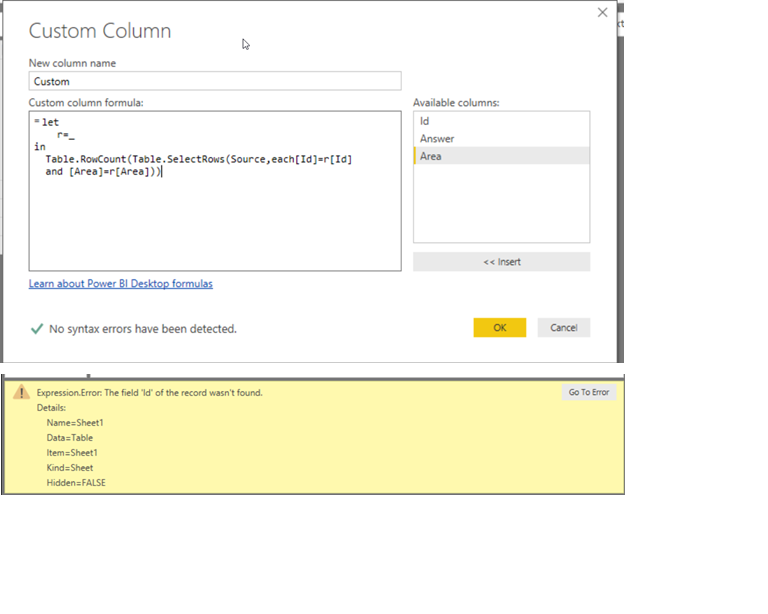
Please see below i am getting below error,From error i can say it is sheet and table error but i am not sure how dealt with this error?
let
Source = Excel.Workbook(File.Contents("C:\Users\deletemondya.xlsx"), null, true),
Sheet1_Sheet = Source{[Item="Sheet1",Kind="Sheet"]}[Data],
#"Promoted Headers" = Table.PromoteHeaders(Sheet1_Sheet, [PromoteAllScalars=true]),
#"Changed Type" = Table.TransformColumnTypes(#"Promoted Headers",{{"Id", Int64.Type}, {"Answer", type text}, {"Area", type text}}),
#"Added Custom" = Table.AddColumn(#"Changed Type", "Custom", each let
r=_
in
Table.RowCount(Table.SelectRows(Source,each[Id]=r[Id]
and [Area]=r[Area]))),
Custom = #"Added Custom"{0}[Custom]
in
CustomThe Power BI Data Visualization World Championships is back! Get ahead of the game and start preparing now!
| User | Count |
|---|---|
| 41 | |
| 39 | |
| 37 | |
| 29 | |
| 24 |
| User | Count |
|---|---|
| 118 | |
| 98 | |
| 70 | |
| 69 | |
| 65 |