Join us at FabCon Atlanta from March 16 - 20, 2026, for the ultimate Fabric, Power BI, AI and SQL community-led event. Save $200 with code FABCOMM.
Register now!The Power BI Data Visualization World Championships is back! Get ahead of the game and start preparing now! Learn more
Hi ,
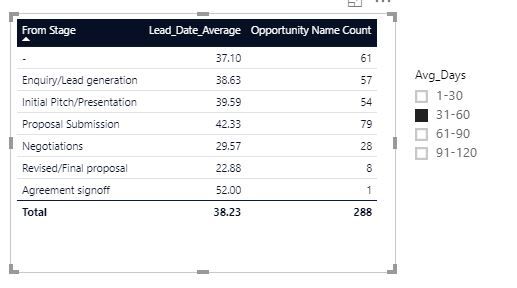
When you select range in slicer, opportunity name count should come based on the lead date average . I need out put like below image.
Formulas which i have used:
Lead Date average = 'Opportunity'[Close Date].[Date]-'Opportunity'[Last Modified].[Date]
Source : https://drive.google.com/open?id=1hlL6bhutQkrRefNlafCFRFz87UtAvpHZ
Thanks in advance
Solved! Go to Solution.
Hi @harib
You may create two calculated columns as below. Attached the sample file for your reference.
Lead Date average2 =
AVERAGEX (
FILTER ( Sheet1, Sheet1[From Stage] = EARLIER ( Sheet1[From Stage] ) ),
Sheet1[Close Date].[Date] - Sheet1[Last Modified].[Date]
)
Avg_Days =
IF (
Sheet1[Lead Date average2] >= 1
&& Sheet1[Lead Date average2] <= 30,
"1-30",
IF (
Sheet1[Lead Date average2] >= 31
&& Sheet1[Lead Date average2] <= 60,
"31-60",
IF (
Sheet1[Lead Date average2] >= 61
&& Sheet1[Lead Date average2] <= 90,
"61-90",
IF (
Sheet1[Lead Date average2] >= 91
&& Sheet1[Lead Date average2] <= 120,
"91-120"
)
)
)
)
Regards,
Cherie
Hi @harib
You may create two calculated columns as below. Attached the sample file for your reference.
Lead Date average2 =
AVERAGEX (
FILTER ( Sheet1, Sheet1[From Stage] = EARLIER ( Sheet1[From Stage] ) ),
Sheet1[Close Date].[Date] - Sheet1[Last Modified].[Date]
)
Avg_Days =
IF (
Sheet1[Lead Date average2] >= 1
&& Sheet1[Lead Date average2] <= 30,
"1-30",
IF (
Sheet1[Lead Date average2] >= 31
&& Sheet1[Lead Date average2] <= 60,
"31-60",
IF (
Sheet1[Lead Date average2] >= 61
&& Sheet1[Lead Date average2] <= 90,
"61-90",
IF (
Sheet1[Lead Date average2] >= 91
&& Sheet1[Lead Date average2] <= 120,
"91-120"
)
)
)
)
Regards,
Cherie
Hi Bro
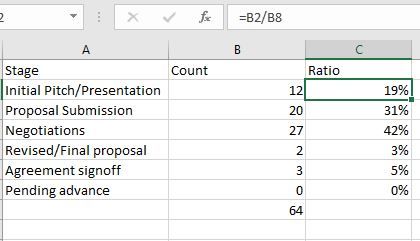
I have a stage column.i want the count of each stage and i want ratio (Each stage count devided by total count) .
I need out put like below table
Source : https://drive.google.com/open?id=19zO_1z4cvdNlPv6hTNfUJG1v9sVhE-Sn
Thanks in advance
Hi @harib
I would suggest you create a new thread on forum so that more community members can see it and provide advice. Please remember to post dummy data and desired result.
Regards,
Cherie
The Power BI Data Visualization World Championships is back! Get ahead of the game and start preparing now!
| User | Count |
|---|---|
| 39 | |
| 37 | |
| 35 | |
| 34 | |
| 27 |
| User | Count |
|---|---|
| 137 | |
| 97 | |
| 74 | |
| 66 | |
| 65 |