Join us at FabCon Atlanta from March 16 - 20, 2026, for the ultimate Fabric, Power BI, AI and SQL community-led event. Save $200 with code FABCOMM.
Register now!The Power BI Data Visualization World Championships is back! Get ahead of the game and start preparing now! Learn more
People.
I have a very large table with a lot of records, where records are inserted per minute.
I need to create a table from this, grouping the AVERAGE values per hour. That is, average the 60 values of the field value_1 at the time 04-05-2022 16:00. But, grouping from the [Fecha_Hora] field of the table. I don't want to add the column:
How do I group by [Fecha_Hora]?
Solved! Go to Solution.
@Syndicate_Admin , I think you need to have to create that column, Now instead of a column, You can use selectcolumns in summarize. In selectcolumns you can give expression for each column
Hi, @Syndicate_Admin
As mentioned by @amitchandak , you have to create the column.
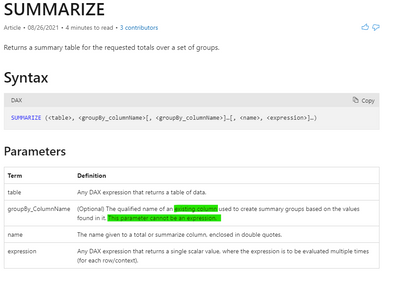
If you want to call the function 'SUMMARIZ' to summarize data based on a column, your column must be a specific column and can not be an expression.
Best Regards,
Community Support Team _ Eason
@Syndicate_Admin , I think you need to have to create that column, Now instead of a column, You can use selectcolumns in summarize. In selectcolumns you can give expression for each column
The Power BI Data Visualization World Championships is back! Get ahead of the game and start preparing now!
| User | Count |
|---|---|
| 40 | |
| 38 | |
| 36 | |
| 29 | |
| 28 |
| User | Count |
|---|---|
| 124 | |
| 88 | |
| 74 | |
| 66 | |
| 65 |