Join us at FabCon Atlanta from March 16 - 20, 2026, for the ultimate Fabric, Power BI, AI and SQL community-led event. Save $200 with code FABCOMM.
Register now!The Power BI Data Visualization World Championships is back! Get ahead of the game and start preparing now! Learn more
Hi Experts,
Need your help! I have a table where I store crime and population in 2 different columns. The population has values like 13,15,17,19, 21,24,25 etc and its crimes are stored in correspondind crime column.
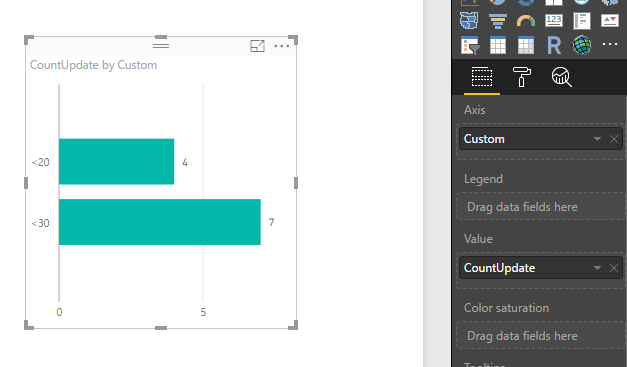
Now in bar chart of power bi, I need to dispay population on x-axis as <20, <30 and so on and the y-axis would have count of crimes with that population range.
Could any one advise how should I get this?
Thank you!
Solved! Go to Solution.
Hi @Anonymous,
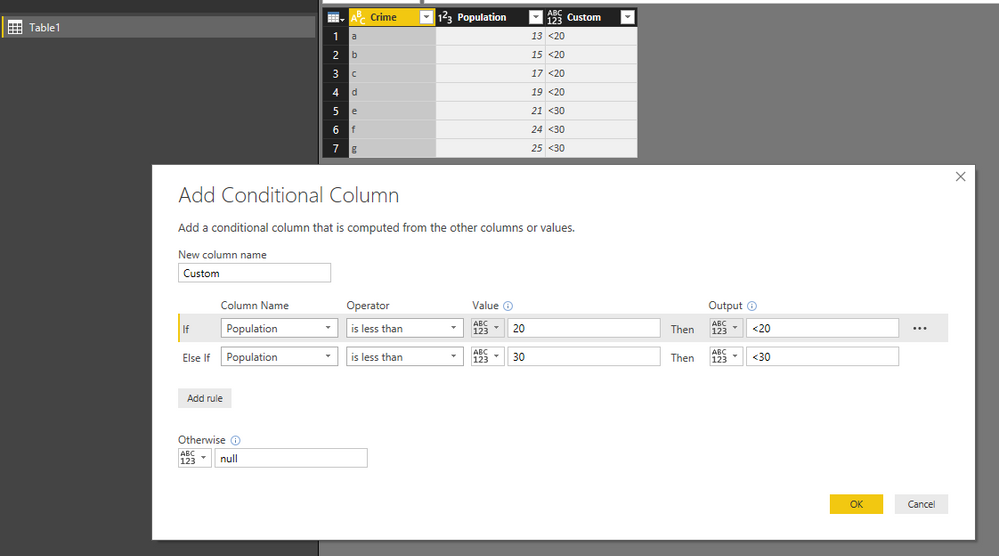
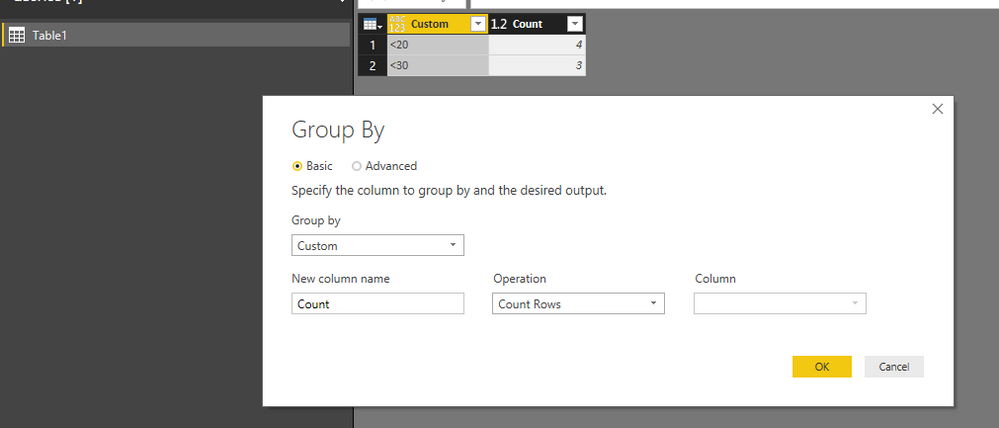
In your scenario, you can open Query Editor, then create a custom column based on the condition <20, 20-30, 30-40, etc. Then group by this new column. Apply the change then back to the report.
Create a calculated column to return actual count based on condition <20, <30,etc.
For more information, you can download attached pbix file.
Best Regards,
QiuyunYu
Hi @Anonymous,
In your scenario, you can open Query Editor, then create a custom column based on the condition <20, 20-30, 30-40, etc. Then group by this new column. Apply the change then back to the report.
Create a calculated column to return actual count based on condition <20, <30,etc.
For more information, you can download attached pbix file.
Best Regards,
QiuyunYu
Hi @v-qiuyu-msft , thank ou so much! All your afforts and time in this matter really appreciated! It worked as you have mentioned. Thanks for detailed screenshots as well.
Thanks!
The Power BI Data Visualization World Championships is back! Get ahead of the game and start preparing now!
| User | Count |
|---|---|
| 38 | |
| 38 | |
| 37 | |
| 28 | |
| 28 |
| User | Count |
|---|---|
| 124 | |
| 89 | |
| 73 | |
| 66 | |
| 65 |