Join us at FabCon Atlanta from March 16 - 20, 2026, for the ultimate Fabric, Power BI, AI and SQL community-led event. Save $200 with code FABCOMM.
Register now!The Power BI Data Visualization World Championships is back! Get ahead of the game and start preparing now! Learn more
Hi Team!
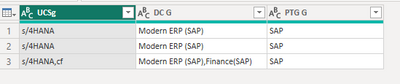
I used Group By > Advanced > Add Aggregates to group my table by 3 columns using ID as the unique identifier. I've successfully done this, but now my results show duplicates. Can you please please help me remove the duplicates per field?
E.g. "SAP, SAP, SAP" should only show "SAP" and "Modern ERP (SAP), Finance (SAP), Finance SAP)" should only show "Modern ERP (SAP), Finance SAP).
Thank you so much!!!
Solved! Go to Solution.
Hi @catcabs ,
Please click "Advanced Editor" to copy and paste the following code, check the steps in the right step bar.
let
Source = Table.FromRows(Json.Document(Binary.Decompress(Binary.FromText("i45WKtY38XD0c1TSUfLNT0ktylNwDQpQ0Ah2DNAECgEppVgd0hTpwOjkNCDCokXHLTMvMS85FQsHu+k6SFgpNhYA", BinaryEncoding.Base64), Compression.Deflate)), let _t = ((type nullable text) meta [Serialized.Text = true]) in type table [UCSg = _t, #"DC G" = _t, #"PTG G" = _t]),
#"Changed Type" = Table.TransformColumnTypes(Source,{{"UCSg", type text}, {"DC G", type text}, {"PTG G", type text}}),
#"Added Custom" = Table.AddColumn(#"Changed Type", "Custom", each List.Distinct(Text.Split([PTG G],","))),
#"Extracted Values" = Table.TransformColumns(#"Added Custom", {"Custom", each Text.Combine(List.Transform(_, Text.From), ","), type text}),
#"Added Custom1" = Table.AddColumn(#"Extracted Values", "Custom.1", each List.Distinct(Text.Split([UCSg],","))),
#"Extracted Values1" = Table.TransformColumns(#"Added Custom1", {"Custom.1", each Text.Combine(List.Transform(_, Text.From), ","), type text}),
#"Added Custom2" = Table.AddColumn(#"Extracted Values1", "Custom.2", each List.Distinct(Text.Split([DC G],","))),
#"Extracted Values2" = Table.TransformColumns(#"Added Custom2", {"Custom.2", each Text.Combine(List.Transform(_, Text.From), ","), type text}),
#"Renamed Columns" = Table.RenameColumns(#"Extracted Values2",{{"Custom.1", "UCSg1"}, {"Custom.2", "DC G1"}, {"Custom", "PTG G1"}}),
#"Reordered Columns" = Table.ReorderColumns(#"Renamed Columns",{"UCSg", "DC G", "PTG G", "UCSg1", "DC G1", "PTG G1"}),
#"Removed Columns" = Table.RemoveColumns(#"Reordered Columns",{"UCSg", "DC G", "PTG G"}),
#"Renamed Columns1" = Table.RenameColumns(#"Removed Columns",{{"UCSg1", "UCSg"}, {"DC G1", "DC G"}, {"PTG G1", "PTG G"}})
in
#"Renamed Columns1"
Best Regards,
Neeko Tang
If this post helps, then please consider Accept it as the solution to help the other members find it more quickly.
Hi @catcabs ,
Please click "Advanced Editor" to copy and paste the following code, check the steps in the right step bar.
let
Source = Table.FromRows(Json.Document(Binary.Decompress(Binary.FromText("i45WKtY38XD0c1TSUfLNT0ktylNwDQpQ0Ah2DNAECgEppVgd0hTpwOjkNCDCokXHLTMvMS85FQsHu+k6SFgpNhYA", BinaryEncoding.Base64), Compression.Deflate)), let _t = ((type nullable text) meta [Serialized.Text = true]) in type table [UCSg = _t, #"DC G" = _t, #"PTG G" = _t]),
#"Changed Type" = Table.TransformColumnTypes(Source,{{"UCSg", type text}, {"DC G", type text}, {"PTG G", type text}}),
#"Added Custom" = Table.AddColumn(#"Changed Type", "Custom", each List.Distinct(Text.Split([PTG G],","))),
#"Extracted Values" = Table.TransformColumns(#"Added Custom", {"Custom", each Text.Combine(List.Transform(_, Text.From), ","), type text}),
#"Added Custom1" = Table.AddColumn(#"Extracted Values", "Custom.1", each List.Distinct(Text.Split([UCSg],","))),
#"Extracted Values1" = Table.TransformColumns(#"Added Custom1", {"Custom.1", each Text.Combine(List.Transform(_, Text.From), ","), type text}),
#"Added Custom2" = Table.AddColumn(#"Extracted Values1", "Custom.2", each List.Distinct(Text.Split([DC G],","))),
#"Extracted Values2" = Table.TransformColumns(#"Added Custom2", {"Custom.2", each Text.Combine(List.Transform(_, Text.From), ","), type text}),
#"Renamed Columns" = Table.RenameColumns(#"Extracted Values2",{{"Custom.1", "UCSg1"}, {"Custom.2", "DC G1"}, {"Custom", "PTG G1"}}),
#"Reordered Columns" = Table.ReorderColumns(#"Renamed Columns",{"UCSg", "DC G", "PTG G", "UCSg1", "DC G1", "PTG G1"}),
#"Removed Columns" = Table.RemoveColumns(#"Reordered Columns",{"UCSg", "DC G", "PTG G"}),
#"Renamed Columns1" = Table.RenameColumns(#"Removed Columns",{{"UCSg1", "UCSg"}, {"DC G1", "DC G"}, {"PTG G1", "PTG G"}})
in
#"Renamed Columns1"
Best Regards,
Neeko Tang
If this post helps, then please consider Accept it as the solution to help the other members find it more quickly.

Check out the November 2025 Power BI update to learn about new features.
Advance your Data & AI career with 50 days of live learning, contests, hands-on challenges, study groups & certifications and more!