cancel
Showing results for 
Search instead for 
Did you mean: 

Learn from the best! Meet the four finalists headed to the FINALS of the Power BI Dataviz World Championships! Register now

Reply
michaelwtk
Regular Visitor

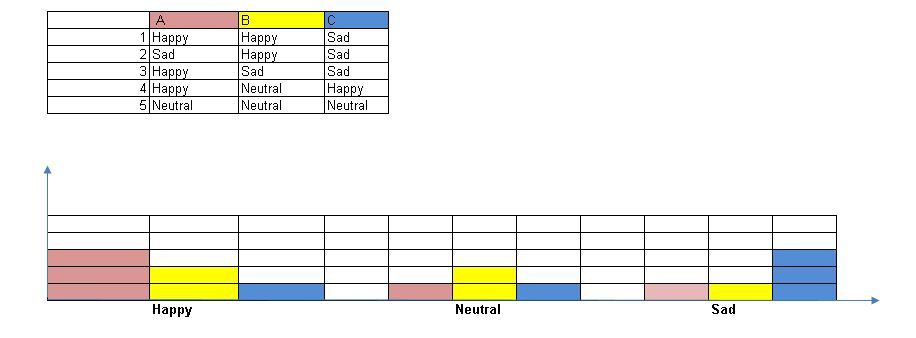
Group Bar chart

 
Given a dataset in the table below, can guide me how to create a group bar chart as shown above? Thanks
I have tried, but once i drag the ColumnA and Column B inside the axis, the bar chart give me same value


BarChart.JPG

1 ACCEPTED SOLUTION
v-yulgu-msft
Microsoft Employee
Microsoft Employee

Hi @michaelwtk,


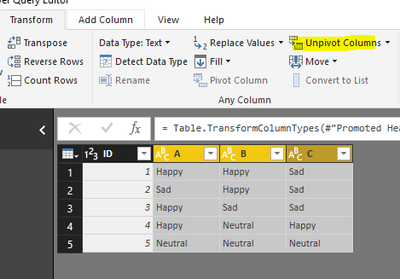
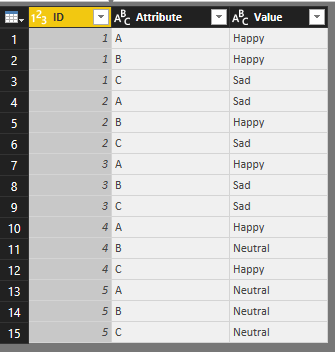
You may need to unpivot original table structure in Query Editor mode.

1.PNG  2.PNG


Then, insert a clustered column chart, add corresponding fields to chart as below:

3.PNG


Best regards,

Yuliana Gu

Community Support Team _ Yuliana Gu
If this post helps, then please consider Accept it as the solution to help the other members find it more quickly.

View solution in original post

6 REPLIES 6
v-yulgu-msft
Microsoft Employee
Microsoft Employee

Hi @michaelwtk,


You may need to unpivot original table structure in Query Editor mode.

1.PNG  2.PNG


Then, insert a clustered column chart, add corresponding fields to chart as below:

3.PNG


Best regards,

Yuliana Gu

Community Support Team _ Yuliana Gu
If this post helps, then please consider Accept it as the solution to help the other members find it more quickly.

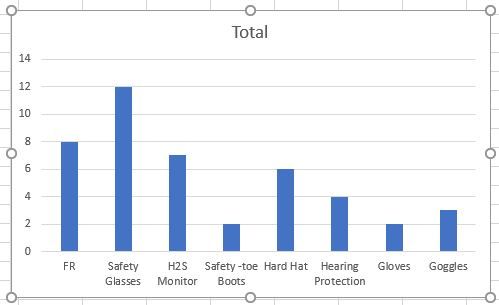
I'm having a similar issue.  However, the data I'm trying to make into a bar chart cannot be combined into one column.  Below is how the chart looks now with an example of how I would like for it to look.  Any help is appreciated.

PPE.JPGExcel.JPG

Thanks Yuliana,

tweo more question.


if i want to sort the x-axis , Neutral, Sad, Happy, how to configure this ? 


if i would like to add both number and percentage , i need to create a new measure? how to achieve that. Many Thanks

michaelwtk
Regular Visitor

Hi All, can anyone help me on the question above ?

Hi @michaelwtk,


There are no visuals in your post (see below). Try editing your post and attaching the chart.


2.PNG


Hi RMDNA, the photo as attached below. Thanks.

BarChart.JPG

Helpful resources

Announcements
Join our Fabric User Panel

Join our Fabric User Panel

Share feedback directly with Fabric product managers, participate in targeted research studies and influence the Fabric roadmap.

February Power BI Update Carousel

Power BI Monthly Update - February 2026

Check out the February 2026 Power BI update to learn about new features.

FabCon Atlanta 2026 carousel

FabCon Atlanta 2026

Join us at FabCon Atlanta, March 16-20, for the ultimate Fabric, Power BI, AI and SQL community-led event. Save $200 with code FABCOMM.

Top Kudoed Authors