Join us at FabCon Atlanta from March 16 - 20, 2026, for the ultimate Fabric, Power BI, AI and SQL community-led event. Save $200 with code FABCOMM.
Register now!The Power BI Data Visualization World Championships is back! Get ahead of the game and start preparing now! Learn more
Hello All...
With immense help from the community, the following DAX formulas counts sum of values equal to zero. Counts zero to the left and to the right of raw_data[CDC(Coarse+Fine) =0:
left 0 = IF ( HASONEVALUE ( raw_data[CDC (Coarse+Fine)]), SUM ( raw_data[Value] ), COUNTROWS ( FILTER ( VALUES(raw_data[CDC (Coarse+Fine)]), raw_data[CDC (Coarse+Fine)]<0&&CALCULATE ( SUM ( raw_data[Value] ) ) = 0 ))) right 0 = IF ( HASONEVALUE ( raw_data[CDC (Coarse+Fine)]), SUM ( raw_data[Value] ), COUNTROWS ( FILTER ( VALUES(raw_data[CDC (Coarse+Fine)]), raw_data[CDC (Coarse+Fine)]>0&&CALCULATE ( SUM ( raw_data[Value] ) ) = 0 )))
The link references the help I recieved for the formulas above:
https://community.powerbi.com/t5/Desktop/Filter-Field-to-Calculate-on-a-Range/m-p/643784#M308485
I need help with counting sum (raw_data[Value]) > 0 but < than the maximum value of the sum(raw_data[Value]) for each of the formulas above. In other words, counting cells not 0 and not Max for each row.
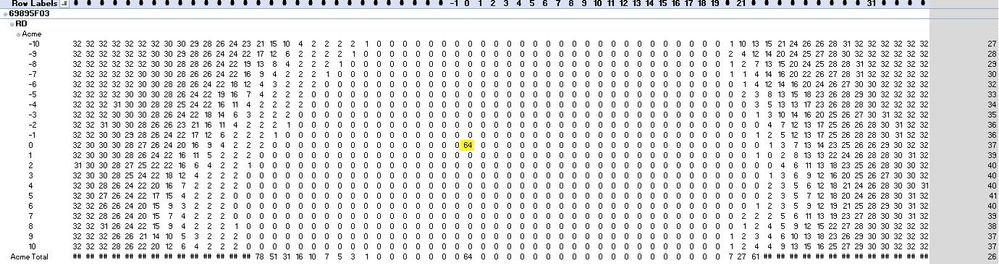
For example, the formula below, counts the cells greater than zero but I'm unsure how to modify it to count less than max. Similar to >0 but < max, for each row. Is it simply adding &&?
right 0 = IF ( HASONEVALUE ( raw_data[CDC (Coarse+Fine)]), SUM ( raw_data[Value] ), COUNTROWS ( FILTER ( VALUES(raw_data[CDC (Coarse+Fine)]), raw_data[CDC (Coarse+Fine)]>0&&CALCULATE ( SUM ( raw_data[Value] ) ) > 0 && )))
Thank you...
Generally, try measure like pattern below and check if it can meet your requirement:
right 0 =
IF (
HASONEVALUE ( raw_data[CDC (Coarse+Fine)] ),
SUM ( raw_data[Value] ),
COUNTROWS (
FILTER (
VALUES ( raw_data[CDC (Coarse+Fine)] ),
raw_data[CDC (Coarse+Fine)] > 0
&& CALCULATE ( SUM ( raw_data[Value] ) ) > 0
&& CALCULATE ( SUM ( raw_data[Value] ) )
< MAXX (
ADDCOLUMNS (
SUMMARIZE ( raw_data, raw_data[CDC (Coarse+Fine)] ),
"Value", CALCULATE ( SUM ( raw_data[Value] ) )
),
[Value]
)
)
)
)
Community Support Team _ Jimmy Tao
If this post helps, then please consider Accept it as the solution to help the other members find it more quickly.
Thanks but the formula is not giving me the count of values <> 0 and <> max for each row.
Maybe that's the way it should be written: Count only values <>0 && <> max. The only problem I have is defining the max value of the row.
For example, the formula below counts all values not equal to (<>) 0.
right 0 =
IF (
HASONEVALUE ( raw_data[CDC (Coarse+Fine)]),
SUM ( raw_data[Value] ),
COUNTROWS (
FILTER ( VALUES(raw_data[CDC (Coarse+Fine)]), raw_data[CDC (Coarse+Fine)]<0&&CALCULATE ( SUM ( raw_data[Value] ) ) <> 0 && <> MAX )))
I just do not know how to define the max value for the row( highlighted in RED).
.... Thanks for your efforts...
The Power BI Data Visualization World Championships is back! Get ahead of the game and start preparing now!
| User | Count |
|---|---|
| 38 | |
| 38 | |
| 37 | |
| 28 | |
| 28 |
| User | Count |
|---|---|
| 124 | |
| 89 | |
| 73 | |
| 66 | |
| 65 |