FabCon is coming to Atlanta
Join us at FabCon Atlanta from March 16 - 20, 2026, for the ultimate Fabric, Power BI, AI and SQL community-led event. Save $200 with code FABCOMM.
Register now!- Power BI forums
- Get Help with Power BI
- Desktop
- Service
- Report Server
- Power Query
- Mobile Apps
- Developer
- DAX Commands and Tips
- Custom Visuals Development Discussion
- Health and Life Sciences
- Power BI Spanish forums
- Translated Spanish Desktop
- Training and Consulting
- Instructor Led Training
- Dashboard in a Day for Women, by Women
- Galleries
- Data Stories Gallery
- Themes Gallery
- Contests Gallery
- QuickViz Gallery
- Quick Measures Gallery
- Visual Calculations Gallery
- Notebook Gallery
- Translytical Task Flow Gallery
- TMDL Gallery
- R Script Showcase
- Webinars and Video Gallery
- Ideas
- Custom Visuals Ideas (read-only)
- Issues
- Issues
- Events
- Upcoming Events
The Power BI Data Visualization World Championships is back! Get ahead of the game and start preparing now! Learn more
- Power BI forums
- Forums
- Get Help with Power BI
- Desktop
- Re: Graphing data on chart
- Subscribe to RSS Feed
- Mark Topic as New
- Mark Topic as Read
- Float this Topic for Current User
- Bookmark
- Subscribe
- Printer Friendly Page


- Mark as New
- Bookmark
- Subscribe
- Mute
- Subscribe to RSS Feed
- Permalink
- Report Inappropriate Content
Graphing data on chart
Hello,
I'm looking to create a chart, where the x-axis has account names and y-axis has reveune. I want to create a filter such that the graph only show data pretaining accounts that have both company1 and company2 information.

Solved! Go to Solution.

- Mark as New
- Bookmark
- Subscribe
- Mute
- Subscribe to RSS Feed
- Permalink
- Report Inappropriate Content
pls try this
Column = if(CALCULATE(DISTINCTCOUNT('Table (2)'[company]),ALLEXCEPT('Table (2)','Table (2)'[account name]))>1,"True",BLANK())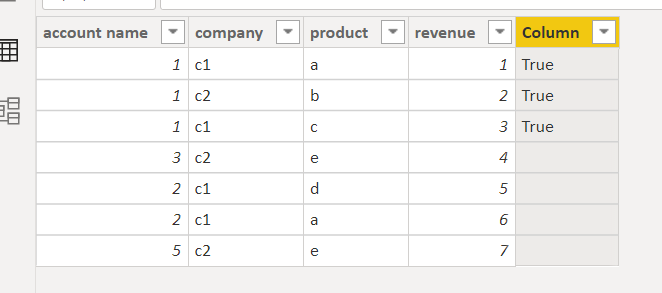
Did I answer your question? Mark my post as a solution!
Proud to be a Super User!
- Mark as New
- Bookmark
- Subscribe
- Mute
- Subscribe to RSS Feed
- Permalink
- Report Inappropriate Content
Hey!
Thanks for your help. It looks like both formulas (table and column) isn't filtering the data as needed. Its still showing data which only has company 1 info. Whereas i would like to only present account and revenue info for accounts are purchasing from both company 1 and company 2.
Is there a way to create a column where it looks at the account name column and then sees if this account has both company 1 and company 2 listed under the company column. If yes, the column will return a "true", if not it will be blank?
- Mark as New
- Bookmark
- Subscribe
- Mute
- Subscribe to RSS Feed
- Permalink
- Report Inappropriate Content
pls try this
Column = if(CALCULATE(COUNTROWS('Table'),ALLEXCEPT('Table','Table'[account name]))>1,"True",BLANK())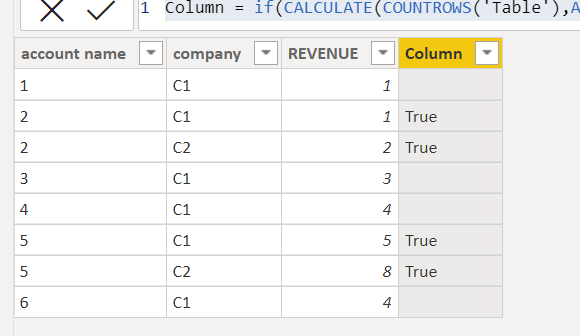
Did I answer your question? Mark my post as a solution!
Proud to be a Super User!
- Mark as New
- Bookmark
- Subscribe
- Mute
- Subscribe to RSS Feed
- Permalink
- Report Inappropriate Content
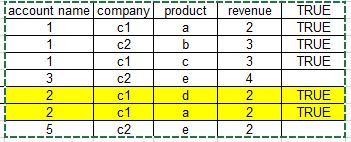
I think i see your logic. I think the image below is a better presentation of my data. Based on the code above, i added a true column. You can see that the yellow highlighted column would also yield a true even though it only has c1 listed under company. Is there a way to develop a formula such that only account 1 would appear
- Mark as New
- Bookmark
- Subscribe
- Mute
- Subscribe to RSS Feed
- Permalink
- Report Inappropriate Content
pls try this
Column = if(CALCULATE(DISTINCTCOUNT('Table (2)'[company]),ALLEXCEPT('Table (2)','Table (2)'[account name]))>1,"True",BLANK())Did I answer your question? Mark my post as a solution!
Proud to be a Super User!
- Mark as New
- Bookmark
- Subscribe
- Mute
- Subscribe to RSS Feed
- Permalink
- Report Inappropriate Content
Is there a way to do this such that i can use it as a filter on a page vs. creating a new table with just the accounts and associated revenue listed? I would like to toggle this feature on and off as i walk through the data
- Mark as New
- Bookmark
- Subscribe
- Mute
- Subscribe to RSS Feed
- Permalink
- Report Inappropriate Content
maybe can create a new column and use that column to filter data
Column = CALCULATE(COUNTROWS('Table'),ALLEXCEPT('Table','Table'[account name]))pls see the attachment below
Did I answer your question? Mark my post as a solution!
Proud to be a Super User!
- Mark as New
- Bookmark
- Subscribe
- Mute
- Subscribe to RSS Feed
- Permalink
- Report Inappropriate Content
maybe you can create a new table
TABLE2 =
VAR tbl=ADDCOLUMNS('Table',"number",CALCULATE(COUNTROWS('Table'),ALLEXCEPT('Table','Table'[account name])))
RETURN SELECTCOLUMNS(FILTER(tbl,[number]>1),"account name",'Table'[account name],"revenue",'Table'[REVENUE])
Did I answer your question? Mark my post as a solution!
Proud to be a Super User!

Helpful resources

Power BI Dataviz World Championships
The Power BI Data Visualization World Championships is back! Get ahead of the game and start preparing now!

Power BI Monthly Update - December 2025
Check out the December 2025 Power BI Holiday Recap!

FabCon Atlanta 2026
Join us at FabCon Atlanta, March 16-20, for the ultimate Fabric, Power BI, AI and SQL community-led event. Save $200 with code FABCOMM.

| User | Count |
|---|---|
| 39 | |
| 37 | |
| 33 | |
| 32 | |
| 29 |


| User | Count |
|---|---|
| 132 | |
| 88 | |
| 82 | |
| 68 | |
| 64 |


