Join us at FabCon Atlanta from March 16 - 20, 2026, for the ultimate Fabric, Power BI, AI and SQL community-led event. Save $200 with code FABCOMM.
Register now!The Power BI Data Visualization World Championships is back! Get ahead of the game and start preparing now! Learn more
Hi,
I have records of customer presence with a start and end date on each row like:
"Joe", "12-Dec-15", "23-Jan-16"
"Mary", "20-Dec-15", "12-Jan-16"
Etc...
I can only produce a graph that shows either the start or end on the axis. However, I need to have a graph over time that counts these customers over the span time betwen start and end.
How can I achieve that? Thanks.
Hi @jesuisbenjamin,
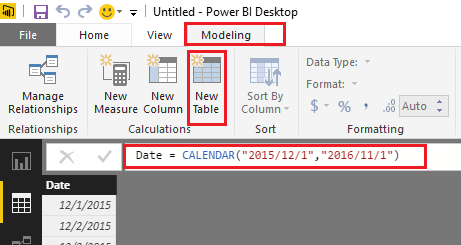
First, you need to create an individual Date table(using CALENDAR or CALENDARAUTO Function (DAX)) if you don't have one yet. And make sure there is no any relationships between the Date table and your records table.
Assume your records table is called "Table1" and the Date table is called "Date", then the formula should like below.![]()
cCounts =
CALCULATE (
COUNTROWS ( Table1 ),
FILTER (
Table1,
MAX ( 'Date'[Date] ) >= Table1[Start Date]
&& MAX ( 'Date'[Date] ) <= Table1[End Date]
)
)
Regards
What do you mean by "create a table" using the CALENDARAUTO function? I looked at the function definition, but don't get the "create a table" part. Please elaborate? Thanks
Hi @jesuisbenjamin,
There is a "New Table" option under Modeling tab of Power BI Desktop. You should be able to click it and type the formula using CALENDAR or CALENDARAUTO Function to create the Date table.
Regards
Thanks. So it just creates a series of all dates between start and end of specified date?
Calendarauto however would select what start and end? Obviously the auto sounds like it will auto update the end date?
Edit 1 : I found out and created a date table usinge CALENDARAUTO() which generated a series of dates.
However, creating the measure, it still isn't showing a running count.
run = CALCULATE(COUNTA(report[Customer]),FILTER(report,MAX('date'[Date]) >= report[start] && MAX('date'[Date]) <= report[End]))
I have tried doing a running count, filtering start and end dates as such:
run = CALCULATE(COUNTA(report[Customer]),FILTER(ALL(report), AND(report[start] <= MAX(report[start]), report[end] >= MAX(report[end]))))
But it doesn't work:
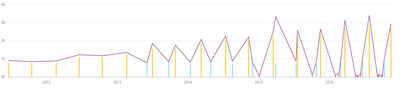
The running count line isn't the running count:
What's wrong with that?
This pattern should help: https://www.powerpivotpro.com/2013/04/counting-active-rows-in-a-time-period-guest-post-from-chris-ca...
The Power BI Data Visualization World Championships is back! Get ahead of the game and start preparing now!
Check out the November 2025 Power BI update to learn about new features.
| User | Count |
|---|---|
| 59 | |
| 46 | |
| 42 | |
| 23 | |
| 18 |
| User | Count |
|---|---|
| 193 | |
| 123 | |
| 99 | |
| 67 | |
| 49 |