Don't miss your chance to take the Fabric Data Engineer (DP-700) exam on us!
Learn moreWe've captured the moments from FabCon & SQLCon that everyone is talking about, and we are bringing them to the community, live and on-demand. Starts on April 14th. Register now
Hi All,
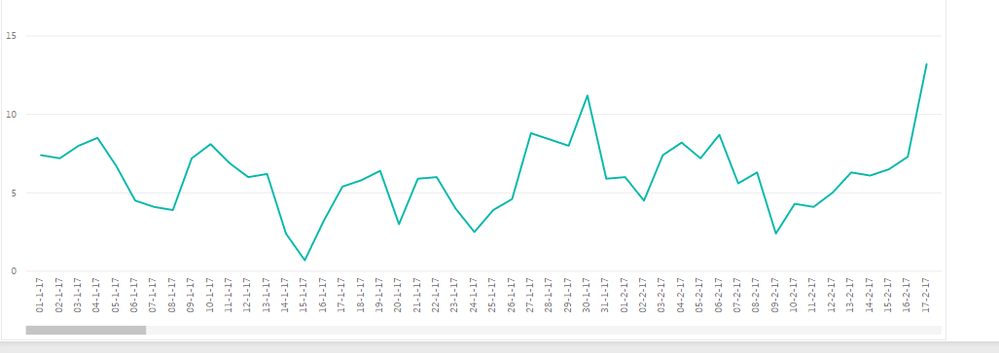
When I chose categorial type under line graph, scroll button appears in the bottom.
How can I get rid of it as I want to see all range all at once.
For example, I want to squeeze 1 Jan 2017 till 1 Dec 2017 (in Width 900 , Height 600) without scrooling .
Appreciate your help!
All the best,
cocomy
one way is to change the font size of X axis and other way could be formatting Date as mm/dd/yy. Just an idea.
rocky 09,
Thank you very much for your advice. I tried your recommendation.
I still have to scroll to see all at once. Appreciate if you can come up with another idea!
All the best,
cocomy
Can you post a screenshot?
Hi Rocky 09
Here is an exapmple. I would like to show Jan 2017 - Dec 2018 without scrolling.
Is it possible to squeeze ?
I like to use line with marker, I need to select categorial in this case.
All the best,
cocomy
You are trying to see all (365 days) in that graph. I don't think, you can see day by day data without a scroller.
Work around 1: Just Put Date on X-axis (Without Date Hirarchy) and then go to format then Change the X-axis Type to Continuous.
Work around 2: You can use Drill Option with Date Hirarchy, So, you can drill down the data without a scroller.
If you have recently started exploring Fabric, we'd love to hear how it's going. Your feedback can help with product improvements.
A new Power BI DataViz World Championship is coming this June! Don't miss out on submitting your entry.
Share feedback directly with Fabric product managers, participate in targeted research studies and influence the Fabric roadmap.
| User | Count |
|---|---|
| 55 | |
| 40 | |
| 35 | |
| 19 | |
| 18 |
| User | Count |
|---|---|
| 73 | |
| 72 | |
| 38 | |
| 35 | |
| 26 |