Join us at FabCon Atlanta from March 16 - 20, 2026, for the ultimate Fabric, Power BI, AI and SQL community-led event. Save $200 with code FABCOMM.
Register now!The Power BI Data Visualization World Championships is back! It's time to submit your entry. Live now!
Hi,
I'm trying to show the percentage of discounts for my customers in a graph. I've calculated the discounts in the following way:
Discount percentage = DIVIDE([Sum of Discounts];[Sum of Revenue])
On the other axis I have the Revenue which and this is then sorted by customer.
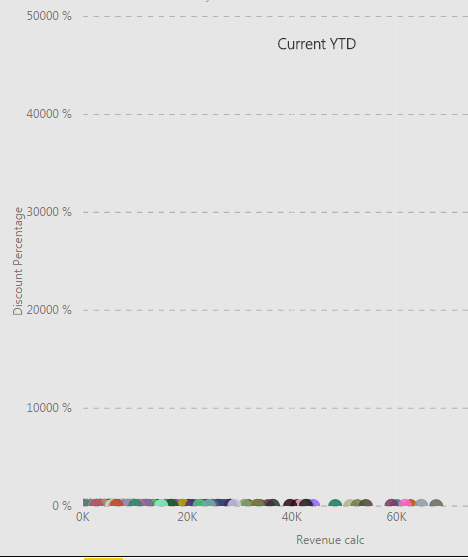
When I put all this in a graph I get the following:
Now I'm wondering why it's scaled like this and how I can get it to scale normally so the graph actually says something?
Cheers,
Mikael
Solved! Go to Solution.
Hi @mekaelj
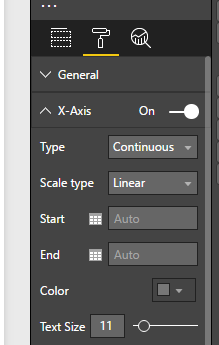
Maybe try and set the start/end of the y-axis to values that make sense. Perhaps set the end value to 100?
HI @mekaelj,
Did these measures contains any specific filters?
If you can please share us more detail contents, it will be help for troubleshooting.(e.g. measure formula, table relationship, screeshots, other filter settings...)
In addition, you can also try to modify Y axis unit size at format tab.
Regards,
Xiaoxin Sheng
Hi @mekaelj
Maybe try and set the start/end of the y-axis to values that make sense. Perhaps set the end value to 100?
The Power BI Data Visualization World Championships is back! It's time to submit your entry.
| User | Count |
|---|---|
| 49 | |
| 43 | |
| 36 | |
| 33 | |
| 30 |
| User | Count |
|---|---|
| 138 | |
| 120 | |
| 60 | |
| 59 | |
| 56 |