cancel
Showing results for 
Search instead for 
Did you mean: 

Learn from the best! Meet the four finalists headed to the FINALS of the Power BI Dataviz World Championships! Register now

Reply
mekaelj
Helper II
Helper II

Graph scale problem

Hi,


I'm trying to show the percentage of discounts for my customers in a graph. I've calculated the discounts in the following way:


Discount percentage = DIVIDE([Sum of Discounts];[Sum of Revenue])


On the other axis I have the Revenue which and this is then sorted by customer.


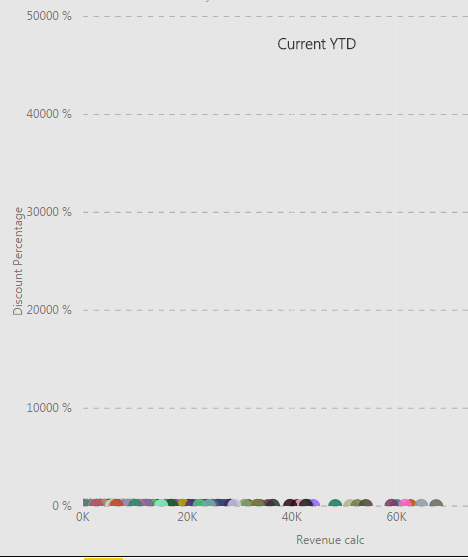
When I put all this in a graph I get the following: 


Capture.PNG


Now I'm wondering why it's scaled like this and how I can get it to scale normally so the graph actually says something?


Cheers,


Mikael

1 ACCEPTED SOLUTION
Phil_Seamark
Microsoft Employee
Microsoft Employee

Hi @mekaelj


Maybe try and set the start/end of the y-axis to values that make sense.  Perhaps set the end value to 100?


To learn more about DAX visit : aka.ms/practicalDAX

Proud to be a Datanaut!

View solution in original post

2 REPLIES 2
Anonymous
Not applicable

HI @mekaelj,


Did these measures contains any specific filters?


If you can please share us more detail contents, it will be help for troubleshooting.(e.g. measure formula, table relationship, screeshots, other filter settings...)


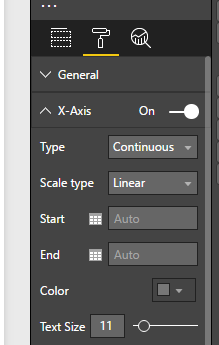
In addition, you can also try to modify Y axis unit size at format tab.

9.PNG


Regards,

Xiaoxin Sheng

Phil_Seamark
Microsoft Employee
Microsoft Employee

Hi @mekaelj


Maybe try and set the start/end of the y-axis to values that make sense.  Perhaps set the end value to 100?


To learn more about DAX visit : aka.ms/practicalDAX

Proud to be a Datanaut!

Helpful resources

Announcements
Join our Fabric User Panel

Join our Fabric User Panel

Share feedback directly with Fabric product managers, participate in targeted research studies and influence the Fabric roadmap.

February Power BI Update Carousel

Power BI Monthly Update - February 2026

Check out the February 2026 Power BI update to learn about new features.

FabCon Atlanta 2026 carousel

FabCon Atlanta 2026

Join us at FabCon Atlanta, March 16-20, for the ultimate Fabric, Power BI, AI and SQL community-led event. Save $200 with code FABCOMM.