Join us at FabCon Atlanta from March 16 - 20, 2026, for the ultimate Fabric, Power BI, AI and SQL community-led event. Save $200 with code FABCOMM.
Register now!Vote for your favorite vizzies from the Power BI Dataviz World Championship submissions. Vote now!
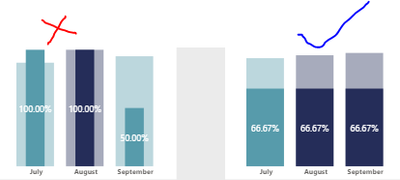
Hi All, Is there a way to represent Graph in same way when we slicer data. When I select an entity from slicer the below graph represnetation is different thought they are exact same setup. Can they be setup in same fashion. Because in presentation viewers were not able to see correctly in Red crossed ones.
@Anonymous , if you select a value from slicer or filter, then it filters that. So you can have measure that can give you percent
divide([measure], calculate([measure],all(Table)) // All to remove filter . But this will not give fill effect.
Just check do have the option to fill with slicer in edit interactions
https://docs.microsoft.com/en-us/power-bi/create-reports/service-reports-visual-interactions
or use a table inplace of slicer
Vote for your favorite vizzies from the Power BI World Championship submissions!
If you love stickers, then you will definitely want to check out our Community Sticker Challenge!
Check out the January 2026 Power BI update to learn about new features.
| User | Count |
|---|---|
| 64 | |
| 51 | |
| 46 | |
| 23 | |
| 19 |
| User | Count |
|---|---|
| 139 | |
| 112 | |
| 51 | |
| 33 | |
| 29 |