This time we’re going bigger than ever. Fabric, Power BI, SQL, AI and more. We're covering it all. You won't want to miss it.
Learn moreLevel up your Power BI skills this month - build one visual each week and tell better stories with data! Get started
Hi everyone,
It's hard to explain what I want to do but I'll try. I have it done with excel.
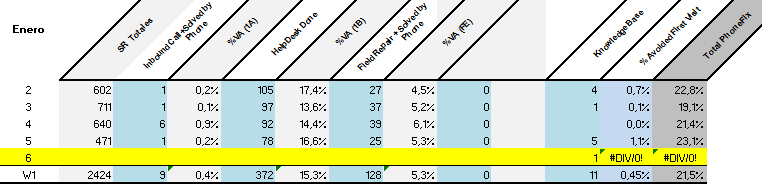
My goal is obtain the last (grey) column. The calculus is the sum of the blue columns divided by the first row. And the dimension on the left is 'Closed Date'.
The problem is that in SR totals(1st column) when I filter the data the dimension is 'Created Date'. But on the blue columns the dimension is 'Closed Date'. My final goal is make a graph with a 'Closed Date' dimension.
In excel I do all the filtering with the tools above and then I put the values by hand in the table. The table has a Closed Date dimension so I put the SR total that has Created Date dimension as if it were the Closed Date. So the question is if I can do this 'cheat' with powerbi.
Then from this table I make the graph below.
Thanks in advance.
Solved! Go to Solution.
Hi,
I can't see in your data the complete thing. But have a look at the DAX expression USERELATIONSHIP()
It allows you to handle with e.g. 2 date columns in one table. It is used as a filter argument in the CALCULATE() function.
Hi,
I can't see in your data the complete thing. But have a look at the DAX expression USERELATIONSHIP()
It allows you to handle with e.g. 2 date columns in one table. It is used as a filter argument in the CALCULATE() function.
Check out the April 2026 Power BI update to learn about new features.
Sign up to receive a private message when registration opens and key events begin.
If you have recently started exploring Fabric, we'd love to hear how it's going. Your feedback can help with product improvements.
| User | Count |
|---|---|
| 30 | |
| 24 | |
| 23 | |
| 17 | |
| 15 |
| User | Count |
|---|---|
| 61 | |
| 36 | |
| 29 | |
| 22 | |
| 22 |