This time we’re going bigger than ever. Fabric, Power BI, SQL, AI and more. We're covering it all. You won't want to miss it.
Learn moreGet Fabric Certified for FREE during AI Skills Fest. This week only. Secure your voucher now.
Hi,
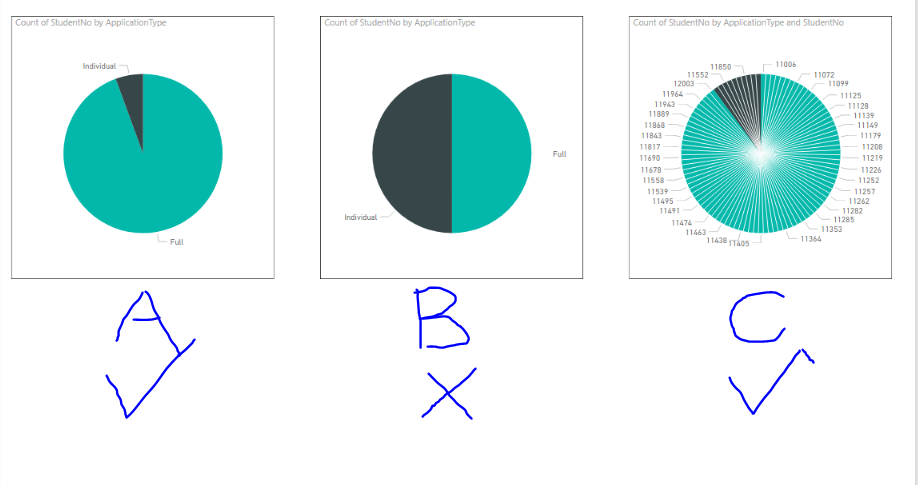
I have two table that are linked on the a field, "StudentNo". I want to create a pie chart using the StudentNo field from the first table, and and another field from the second table. However it does not seem to work correctly. See below:
In A I use both StudentNo and Type from Table1. It works.
In B I use StudentNo from Table2 and Type from Table1. It does not work.
In C I use StudentNo from Table2 and Type from Table1, but I also add the StudentNo to the detail. This creates a graph that looks almost like I need to look in A. It also shows that using the StudentNo and Type from different tables, a relationship can be created.
Thus I want it to look like in A, but use values from the two different graphs to achieve. The PBI file ("Graph Query") can be found here:
https://drive.google.com/drive/u/0/folders/1P10op_192ac_m-QGqt-QjolaLZSIMc_t
Thanks!
Solved! Go to Solution.
@DieLem,
I note that you create one-to-many relationship between the two tables, however, the StudentNo field of Student table doesn't contain all the possible StudentNo values in StudentNo field of AcademicApplication table, this is the reason why you get wrong result in graph B.
Regards,
Lydia
@DieLem,
I note that you create one-to-many relationship between the two tables, however, the StudentNo field of Student table doesn't contain all the possible StudentNo values in StudentNo field of AcademicApplication table, this is the reason why you get wrong result in graph B.
Regards,
Lydia
Check out the May 2026 Power BI update to learn about new features.
Sign up to receive a private message when registration opens and key events begin.
If you have recently started exploring Fabric, we'd love to hear how it's going. Your feedback can help with product improvements.
| User | Count |
|---|---|
| 23 | |
| 21 | |
| 21 | |
| 21 | |
| 16 |
| User | Count |
|---|---|
| 55 | |
| 53 | |
| 45 | |
| 26 | |
| 24 |