Get Fabric or SQL Certified for Free.
Get certified for free when you join Fabric Data Days 2026 and dive into Fabric, Power BI, SQL, AI, and other essential data skills.
Join now- Power BI forums
- Get Help with Power BI
- Desktop
- Service
- Report Server
- Power Query
- Mobile Apps
- Developer
- DAX Commands and Tips
- Custom Visuals Development Discussion
- Health and Life Sciences
- Power BI Spanish forums
- Translated Spanish Desktop
- Training and Consulting
- Instructor Led Training
- Dashboard in a Day for Women, by Women
- Galleries
- Data Stories Gallery
- Themes Gallery
- Contests Gallery
- QuickViz Gallery
- Quick Measures Gallery
- Visual Calculations Gallery
- Notebook Gallery
- Translytical Task Flow Gallery
- TMDL Gallery
- R Script Showcase
- Webinars and Video Gallery
- Ideas
- Custom Visuals Ideas (read-only)
- Issues
- Issues
- Events
- Upcoming Events
July 7 - July 17 | Round 2 of the Power BI Dataviz World Championships. Don't miss your chance! Learn more
- Power BI forums
- Forums
- Get Help with Power BI
- Desktop
- Re: Graph Hover Options
- Subscribe to RSS Feed
- Mark Topic as New
- Mark Topic as Read
- Float this Topic for Current User
- Bookmark
- Subscribe
- Printer Friendly Page

- Mark as New
- Bookmark
- Subscribe
- Mute
- Subscribe to RSS Feed
- Permalink
- Report Inappropriate Content
Graph Hover Options
Hello,
When you hover over the line in a graph, you see the full value. Is it possible to change the way this is shown? With data labels, you can change the display units to thousands for example. I would like to do this when you hover over the line, if it is possible.
Any help would be greatly appreciated.
Jelle
Solved! Go to Solution.


- Mark as New
- Bookmark
- Subscribe
- Mute
- Subscribe to RSS Feed
- Permalink
- Report Inappropriate Content
Hi @Jelle,
Write measures to get the value of each row per category or what ever u want.
Suppose,
Measure for compare = Measure for compare = CALCULATE(SUMX(your_table_name,your_table_name[amount]), ALLEXCEPT(your_table_name,your_table_name[name]))
next measure,
Num format =
IF (
[Measure for compare] >= 1000000,
FORMAT ( [Measure for compare], "#,##0,,m" ),
IF (
[Measure for compare] >= 1000,
FORMAT ( [Measure for compare], "#,##0,k" ),
FORMAT ( [Measure for compare], "General Number" )
)
)
check and let me know..... 🙂


- Mark as New
- Bookmark
- Subscribe
- Mute
- Subscribe to RSS Feed
- Permalink
- Report Inappropriate Content
Hi @Jelle,
After test, another way you can set the display values in thousands, please review the first screenshot, it display the original value of each year, you can choose "thousands"(highlighted in yellow background) on the data label under Format, please see the second screenshot.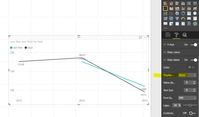

Best Regards,
Angelia
- Mark as New
- Bookmark
- Subscribe
- Mute
- Subscribe to RSS Feed
- Permalink
- Report Inappropriate Content
Hi @Jelle,
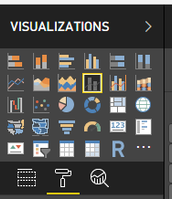
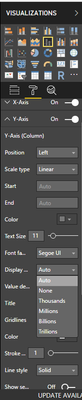
use the below graph visual as shown below and put the values in line values. Then goto y-axis under that display dropdown. select what ever you wanna display like thousands, auto, e.t.c
- Mark as New
- Bookmark
- Subscribe
- Mute
- Subscribe to RSS Feed
- Permalink
- Report Inappropriate Content
Thanks @mehaboob557,

I was trying to change this, I should have added a picture the first time. Is is possible to show those numbers in thousands?
- Mark as New
- Bookmark
- Subscribe
- Mute
- Subscribe to RSS Feed
- Permalink
- Report Inappropriate Content
- Mark as New
- Bookmark
- Subscribe
- Mute
- Subscribe to RSS Feed
- Permalink
- Report Inappropriate Content
- Mark as New
- Bookmark
- Subscribe
- Mute
- Subscribe to RSS Feed
- Permalink
- Report Inappropriate Content
Hi @Jelle,
Write measures to get the value of each row per category or what ever u want.
Suppose,
Measure for compare = Measure for compare = CALCULATE(SUMX(your_table_name,your_table_name[amount]), ALLEXCEPT(your_table_name,your_table_name[name]))
next measure,
Num format =
IF (
[Measure for compare] >= 1000000,
FORMAT ( [Measure for compare], "#,##0,,m" ),
IF (
[Measure for compare] >= 1000,
FORMAT ( [Measure for compare], "#,##0,k" ),
FORMAT ( [Measure for compare], "General Number" )
)
)
check and let me know..... 🙂
- Mark as New
- Bookmark
- Subscribe
- Mute
- Subscribe to RSS Feed
- Permalink
- Report Inappropriate Content
Thank you very much for helping @mehaboob557. I will try this and report back later!
- Mark as New
- Bookmark
- Subscribe
- Mute
- Subscribe to RSS Feed
- Permalink
- Report Inappropriate Content
Hi @Jelle,
After test, another way you can set the display values in thousands, please review the first screenshot, it display the original value of each year, you can choose "thousands"(highlighted in yellow background) on the data label under Format, please see the second screenshot.
Best Regards,
Angelia
- Mark as New
- Bookmark
- Subscribe
- Mute
- Subscribe to RSS Feed
- Permalink
- Report Inappropriate Content
Hi @Jelle,
Please mark the right reply as answer if you have resolved your issue, so more people will get helpful information from here. Thanks for understanding.
Best Regards,
Angelia
- Mark as New
- Bookmark
- Subscribe
- Mute
- Subscribe to RSS Feed
- Permalink
- Report Inappropriate Content
Ok... If its working fine... Give a kudo and accept the solutions

Helpful resources

FabCon & SQLCon – Barcelona 2026
Join us in Barcelona for FabCon and SQLCon, the Fabric, Power BI, SQL, and AI community event. Save €200 with code FABCMTY200.

Data Days 2026
Join Data Days 2026: 60 days of free live/on-demand sessions, challenges, study groups, and certification opportunities.

Power BI DataViz World Championships - June 2026
A new Power BI DataViz World Championship is coming this June! Don't miss out on submitting your entry.

| User | Count |
|---|---|
| 28 | |
| 23 | |
| 18 | |
| 18 | |
| 15 |


| User | Count |
|---|---|
| 47 | |
| 44 | |
| 43 | |
| 34 | |
| 30 |


