Join us at FabCon Atlanta from March 16 - 20, 2026, for the ultimate Fabric, Power BI, AI and SQL community-led event. Save $200 with code FABCOMM.
Register now!Learn from the best! Meet the four finalists headed to the FINALS of the Power BI Dataviz World Championships! Register now
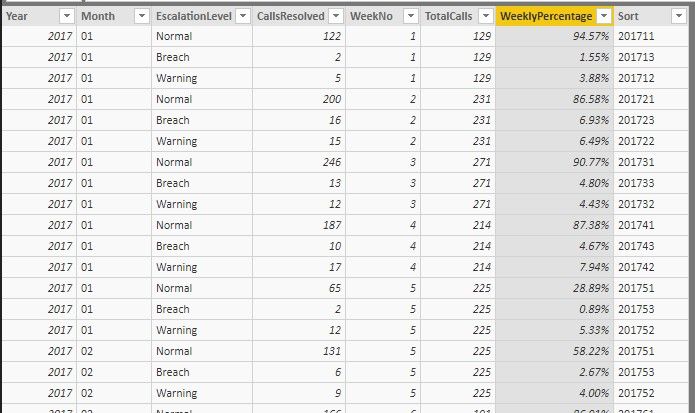
I have a table containing, Year, and WeekNumber in two columns the data, WeeklyPercentage, and a sorting column Sort.
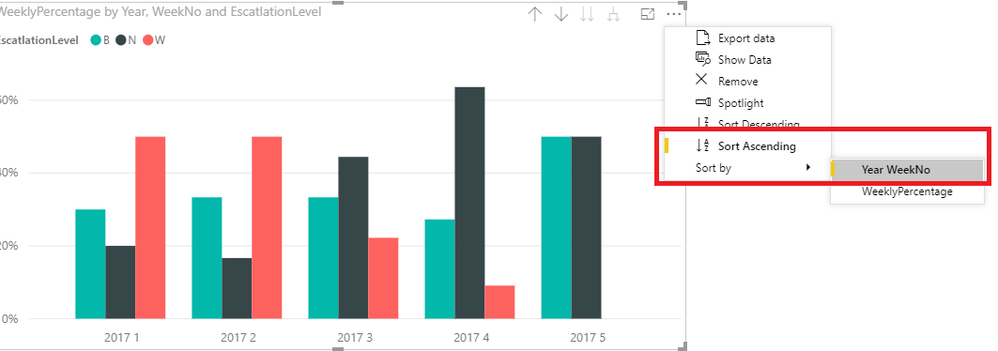
I want to display the data on a graph with year and week number along x axis, WeeklyPercentage on the y axis and EscatlationLevel as the legend.
The graph always displays with the sorted by the WeeklyPercentage descending (sorted by y axis rather than x axis). I want to display with the x axis sorted
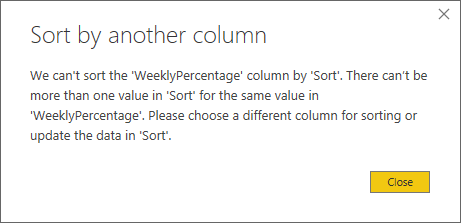
I have added the Sort column, but if I try and sort the WeeklyPercentage columns (contains duplicates) by this Sort column (doesn't contain duplicates) I get the following error.
How do I display with the X axis is sorted by Year and then WeekNo?
Solved! Go to Solution.
Hi @Anonymous
You may try to use 'Sort by' as below picture.
Regards,
Cherie
Hi @Anonymous
You may try to use 'Sort by' as below picture.
Regards,
Cherie
That seems to have sorted it. So Simple when you know how!
can you add some sample data. So, I can try.
Share feedback directly with Fabric product managers, participate in targeted research studies and influence the Fabric roadmap.
Check out the February 2026 Power BI update to learn about new features.
| User | Count |
|---|---|
| 50 | |
| 49 | |
| 35 | |
| 15 | |
| 14 |
| User | Count |
|---|---|
| 91 | |
| 75 | |
| 41 | |
| 26 | |
| 25 |