cancel
Showing results for 
Search instead for 
Did you mean: 

The Power BI Data Visualization World Championships is back! Get ahead of the game and start preparing now! Learn more

Reply
msarfaraz
Frequent Visitor

Data table Calculation from Same folder

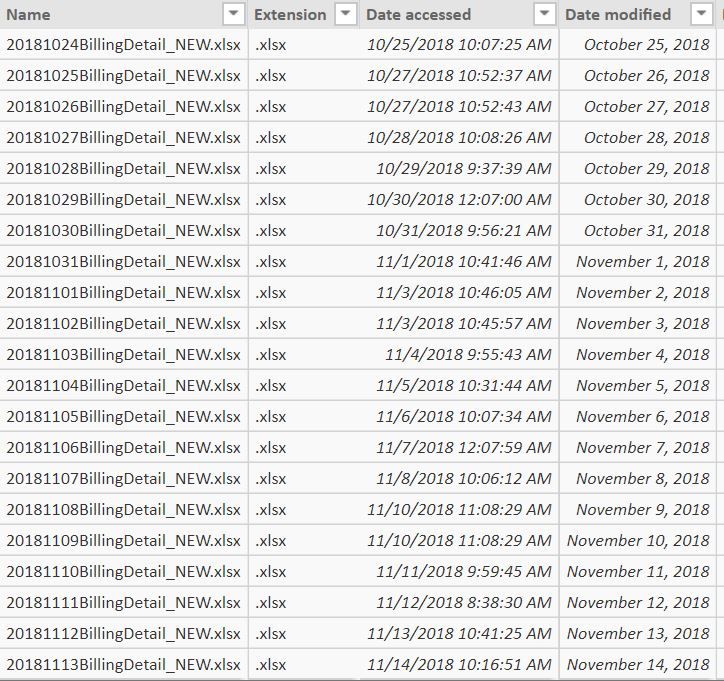
I have below files in a folder and would like the calculation in data as per modification date (each file has 3 column and i would need to calculate difference on data from one date to another date, example date modified from Nov 2 - 14 Nov ) any help in this matter will be appreciated. 


In below report its shows that on Nov 2 is 1340 and 14th Nov is 1670, I need to show the difference between two which is 330


Data file1.JPGData file.JPG

2 REPLIES 2
v-piga-msft
Resident Rockstar
Resident Rockstar

Hi @msarfaraz,


You could have a try with the measue below.


Measure = CALCULATE(MAX('Table1'[Nights]))-CALCULATE(MIN('Table1'[Nights]))

Here is my test output.


result.PNG

If you still need help, please share some data sample which I could copy and make a test.


In addition, you could have a reference of the attachment. 


Best Regards,

Cherry

Community Support Team _ Cherry Gao
If this post helps, then please consider Accept it as the solution to help the other members find it more quickly.

Many thanks for your reply 


In my case the modified data field is file modified date, have a look the pbix file below.


https://drive.google.com/open?id=1nkByOEV_XIZ9enkZZuXNahYhTa1Drusk

Helpful resources

Announcements
Power BI DataViz World Championships

Power BI Dataviz World Championships

The Power BI Data Visualization World Championships is back! Get ahead of the game and start preparing now!

December 2025 Power BI Update Carousel

Power BI Monthly Update - December 2025

Check out the December 2025 Power BI Holiday Recap!

FabCon Atlanta 2026 carousel

FabCon Atlanta 2026

Join us at FabCon Atlanta, March 16-20, for the ultimate Fabric, Power BI, AI and SQL community-led event. Save $200 with code FABCOMM.