cancel
Showing results for 
Search instead for 
Did you mean: 

Level up your Power BI skills this month - build one visual each week and tell better stories with data! Get started

Reply
Anonymous
Not applicable

Graph API Error

Hallo,


i need data from the Graph API in PBI.

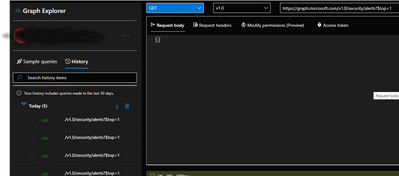
I can use the Graph Explorer without any problems and have Permissions

Cano_1-1645627099828.png

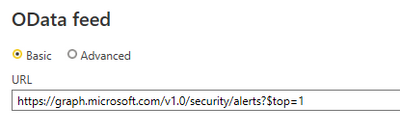
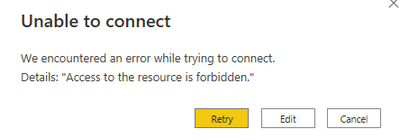
When i use Web or 0Data feed i get a forbidden error:

Cano_2-1645627166802.png

Cano_3-1645627176872.png


What can i do??


1 ACCEPTED SOLUTION
Watsky
Solution Sage
Solution Sage

Hi @Anonymous ,

Since MS Graph uses OAuth 2.0 you'll need to

  • Register an app in Azure; and
  • Create a custom connector to get it working in Power BI. 

Solved: Use Microsoft Graph API as data source - Microsoft Power BI Community

Microsoft does have a GitHub page dedicated to custom connectors with one of the samples being a MS Graph example (MyGraph) and a getting started guide. GitHub - microsoft/DataConnectors: Data Connector SDK and samples for Power Query and Power BI

You can also take a look at Microsoft Graph auth overview | Microsoft Docs for an overview of the authentication portion. 


Did my answer(s) help you? Give it a kudos by clicking the Thumbs Up!
Did my post answer your question(s)? Mark my post as a solution. This will help others find the solution.

Proud to be a Super User!

View solution in original post

1 REPLY 1
Watsky
Solution Sage
Solution Sage

Hi @Anonymous ,

Since MS Graph uses OAuth 2.0 you'll need to

  • Register an app in Azure; and
  • Create a custom connector to get it working in Power BI. 

Solved: Use Microsoft Graph API as data source - Microsoft Power BI Community

Microsoft does have a GitHub page dedicated to custom connectors with one of the samples being a MS Graph example (MyGraph) and a getting started guide. GitHub - microsoft/DataConnectors: Data Connector SDK and samples for Power Query and Power BI

You can also take a look at Microsoft Graph auth overview | Microsoft Docs for an overview of the authentication portion. 


Did my answer(s) help you? Give it a kudos by clicking the Thumbs Up!
Did my post answer your question(s)? Mark my post as a solution. This will help others find the solution.

Proud to be a Super User!

Helpful resources

Announcements
April Power BI Update Carousel

Power BI Monthly Update - April 2026

Check out the April 2026 Power BI update to learn about new features.

Fabric SQL PBI Data Days

Data Days 2026 coming soon!

Sign up to receive a private message when registration opens and key events begin.

New to Fabric survey Carousel

New to Fabric Survey

If you have recently started exploring Fabric, we'd love to hear how it's going. Your feedback can help with product improvements.

Power BI DataViz World Championships carousel

Power BI DataViz World Championships - June 2026

A new Power BI DataViz World Championship is coming this June! Don't miss out on submitting your entry.