cancel
Showing results for 
Search instead for 
Did you mean: 

Next up in the FabCon + SQLCon recap series: The roadmap for Microsoft SQL and Maximizing Developer experiences in Fabric. All sessions are available on-demand after the live show. Register now

Reply
Anonymous
Not applicable

Granularity issue

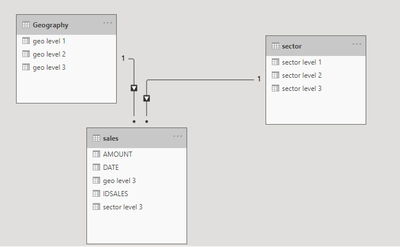
have three tables geography, sector and sales:


jaweher89_0-1619816654744.png


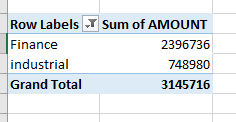
when I test the results:


jaweher89_1-1619816684100.png


Expected results: how to correct it?


jaweher89_2-1619816711597.png


I put an example of pbix file https://drive.google.com/file/d/1SnEAuCTkPRNnFk9fFBsD4Ke8fhCxmqb6/view?usp=drivesdk

1 ACCEPTED SOLUTION
Anonymous
Not applicable

Hi @Anonymous ,


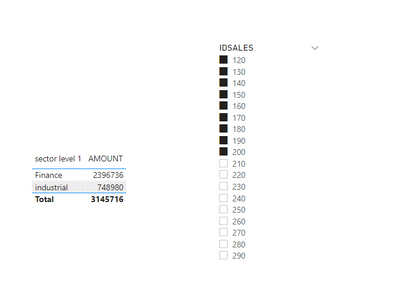
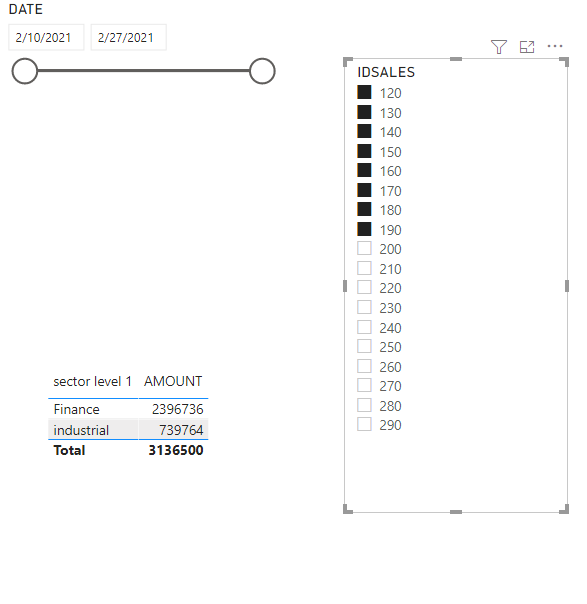
Based on your description, I did a test. Maybe you have set a filter on "IDSALES" column like "<=200".

v-yuaj-msft_0-1620200895318.png

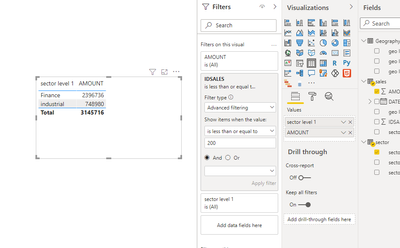
If you want to display this value on Power BI Desktop, You could just drag the field of "IDSALES" to the filter on table visual as follows.

v-yuaj-msft_1-1620201092714.png

Hope that's what you were looking for.

Best Regards,

Yuna


If this post helps, then please consider Accept it as the solution to help the other members find it more quickly.


View solution in original post

4 REPLIES 4
Anonymous
Not applicable

Hi @Anonymous ,


Could you tell me if your problem has been solved? If it is, kindly Accept it as the solution. More people will benefit from it. Or you are still confused about it, please provide me with more details about your problem.


Best Regards,

Yuna

Anonymous
Not applicable

Hi @Anonymous ,


Based on your description, I did a test. Maybe you have set a filter on "IDSALES" column like "<=200".

v-yuaj-msft_0-1620200895318.png

If you want to display this value on Power BI Desktop, You could just drag the field of "IDSALES" to the filter on table visual as follows.

v-yuaj-msft_1-1620201092714.png

Hope that's what you were looking for.

Best Regards,

Yuna


If this post helps, then please consider Accept it as the solution to help the other members find it more quickly.


Fowmy
Super User
Super User

@Anonymous 

I think you have applied a filter on the IDSALES column in the sales table for IDs from 120 to 190. When I apply the same in Power BI you get the results, almost.

Fowmy_0-1619824978066.png.


Did I answer your question? Mark my post as a solution! and hit thumbs up


Subscribe and learn Power BI from these videos

Website LinkedIn PBI User Group

Applicable88
Impactful Individual

Hello @Anonymous,

its not easy to say,how you got your results from, because you filtered something else in your excel sheet. 

But as far I can see, you used the whole date range. And looking for industrial and finance in column sector1. Looking at the complete sales table actually every row consist of industrial or finance branch in column sector 1. So of course the total sum is 6291432.

A tip as well for connecting tables: Its easier to use distinct ID's. You use many equal names which looks more ambiguous. But anyway, in the data you tried to filter, the other dimension table didn't even come into play.

Hope it helps. 

Helpful resources

Announcements
New to Fabric survey Carousel

New to Fabric Survey

If you have recently started exploring Fabric, we'd love to hear how it's going. Your feedback can help with product improvements.

Power BI DataViz World Championships carousel

Power BI DataViz World Championships - June 2026

A new Power BI DataViz World Championship is coming this June! Don't miss out on submitting your entry.

Join our Fabric User Panel

Join our Fabric User Panel

Share feedback directly with Fabric product managers, participate in targeted research studies and influence the Fabric roadmap.

March Power BI Update Carousel

Power BI Community Update - March 2026

Check out the March 2026 Power BI update to learn about new features.