FabCon is coming to Atlanta
Join us at FabCon Atlanta from March 16 - 20, 2026, for the ultimate Fabric, Power BI, AI and SQL community-led event. Save $200 with code FABCOMM.
Register now!- Power BI forums
- Get Help with Power BI
- Desktop
- Service
- Report Server
- Power Query
- Mobile Apps
- Developer
- DAX Commands and Tips
- Custom Visuals Development Discussion
- Health and Life Sciences
- Power BI Spanish forums
- Translated Spanish Desktop
- Training and Consulting
- Instructor Led Training
- Dashboard in a Day for Women, by Women
- Galleries
- Data Stories Gallery
- Themes Gallery
- Contests Gallery
- QuickViz Gallery
- Quick Measures Gallery
- Visual Calculations Gallery
- Notebook Gallery
- Translytical Task Flow Gallery
- TMDL Gallery
- R Script Showcase
- Webinars and Video Gallery
- Ideas
- Custom Visuals Ideas (read-only)
- Issues
- Issues
- Events
- Upcoming Events
Learn from the best! Meet the four finalists headed to the FINALS of the Power BI Dataviz World Championships! Register now
- Power BI forums
- Forums
- Get Help with Power BI
- Desktop
- Re: Grand total wrong when using =IF formula
- Subscribe to RSS Feed
- Mark Topic as New
- Mark Topic as Read
- Float this Topic for Current User
- Bookmark
- Subscribe
- Printer Friendly Page


- Mark as New
- Bookmark
- Subscribe
- Mute
- Subscribe to RSS Feed
- Permalink
- Report Inappropriate Content
Grand total wrong when using =IF formula
Hey guys. I’m new to Power BI and I’ve encountered a problem I can’t seem to fix. I’m not at liberty to post the actual numbers or a picture of the connections (everything should be connected though). I’ve got two different databases, which I’m pulling numbers from (see picture).
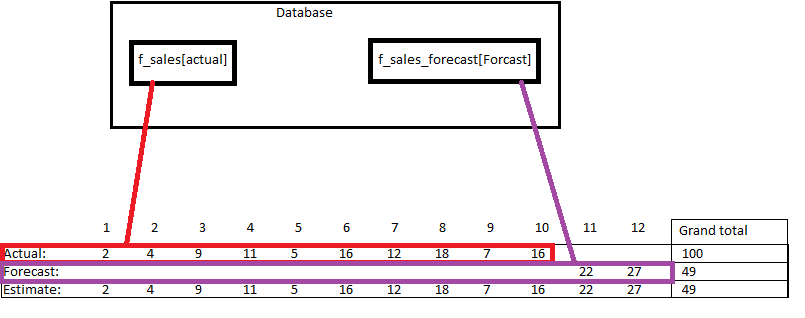
I got the following variables:
Tables:
Actual = revenue secured
Forecast = forecast
Measure:
Estimate = actual for the secured months and then forecast for the following months.
Formula for Estimate:
Estimate ($) = (if(sum(f_sales_forecast[Forecast])=0;sum(f_sales[Actual]);sum(f_sales_forecast[Forecast])))
The grand total only counts the forecasted period (49), and ignores the rest of the numbers that comes from Actual (100). What am I doing wrong?
Thanks for your help in advance
Solved! Go to Solution.

- Mark as New
- Bookmark
- Subscribe
- Mute
- Subscribe to RSS Feed
- Permalink
- Report Inappropriate Content
It seems you forgot a part in your formula. You wrote this one:
Estimate ($) = (if(sum(f_sales_forecast[Forecast])=0;sum(f_sales[Actual]);sum(f_sales_forecast[Forecast])))
But if you want the sum of Actual + Forcast, you should write something like:
Estimate ($) = (if(sum(f_sales_forecast[Forecast])=0;sum(f_sales[Actual]);sum(f_sales_forecast[Forecast])+sum(f_sales[Actual])))
and it will give you your Grand Total

- Mark as New
- Bookmark
- Subscribe
- Mute
- Subscribe to RSS Feed
- Permalink
- Report Inappropriate Content
Hello,
I recreated this using a simpler table, and i think you are not supposed to use sum on every step.
I got it working using the following formula:
Estimate = IF(Table2[Forecast] = 0;Table2[Actual];Table2[Forecast])
Make sure you change the table names.
If it doesn't work for you, or if you have any questions please ask.
Good luck
- Mark as New
- Bookmark
- Subscribe
- Mute
- Subscribe to RSS Feed
- Permalink
- Report Inappropriate Content
Hi @BeemsC
If i don't use the sum function I can't select the Tables for some reason.

Br
Pastrupgaard
- Mark as New
- Bookmark
- Subscribe
- Mute
- Subscribe to RSS Feed
- Permalink
- Report Inappropriate Content
It seems you forgot a part in your formula. You wrote this one:
Estimate ($) = (if(sum(f_sales_forecast[Forecast])=0;sum(f_sales[Actual]);sum(f_sales_forecast[Forecast])))
But if you want the sum of Actual + Forcast, you should write something like:
Estimate ($) = (if(sum(f_sales_forecast[Forecast])=0;sum(f_sales[Actual]);sum(f_sales_forecast[Forecast])+sum(f_sales[Actual])))
and it will give you your Grand Total
- Mark as New
- Bookmark
- Subscribe
- Mute
- Subscribe to RSS Feed
- Permalink
- Report Inappropriate Content
Hey @GregoryMartin
You're totally right and that gets me a lot closer to the issue, but I forgot about the last part of the problem. So the Estimate should consist of the [actual] up until the [forcast] kicks in. What my formula does now, is take both the [actual] and the [forcast] for month 11 and 12, which gives me a wrong estimate.
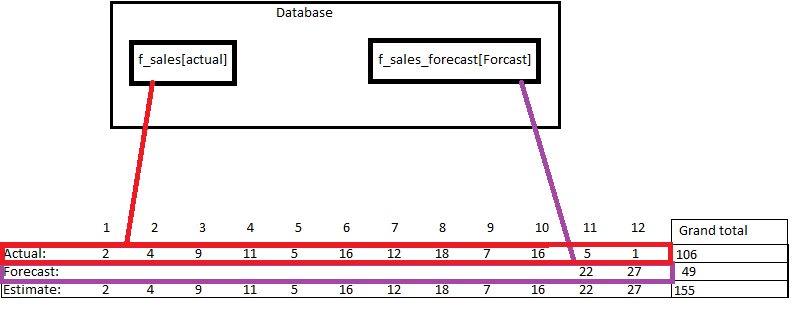
Right now my grand total for Estimate is 155 and i would like it to give me 149 (10 months actual and 2 months forecast)
I hope that made sense.
Br
Pastrupgaard
- Mark as New
- Bookmark
- Subscribe
- Mute
- Subscribe to RSS Feed
- Permalink
- Report Inappropriate Content
Yeap,
There weren't values on the first screen for [actual] on month 11 & 12. Now you've got some. I think, if you just want the [forecast] value in that case, you may create a new column in power BI using a formula looking like the first one you did.
NewColumn = if(f_sales_forecast[Forecast]=0;f_sales[Actual];f_sales_forecast[Forecast])
You'll have then a column with values for months 1 to 12 corresponding at your wish. Now you just need for your Grand Total cell to do a sum of this column. You should now have your 149 value.
- Mark as New
- Bookmark
- Subscribe
- Mute
- Subscribe to RSS Feed
- Permalink
- Report Inappropriate Content
I've tried a lot of different things and the problem with creating a new column is that i have to pull data from two different databases, so the number in the column is the same all the way down through the rows. Any bright ideas :D?

Helpful resources

Join our Fabric User Panel
Share feedback directly with Fabric product managers, participate in targeted research studies and influence the Fabric roadmap.

Power BI Monthly Update - February 2026
Check out the February 2026 Power BI update to learn about new features.

FabCon Atlanta 2026
Join us at FabCon Atlanta, March 16-20, for the ultimate Fabric, Power BI, AI and SQL community-led event. Save $200 with code FABCOMM.

| User | Count |
|---|---|
| 68 | |
| 61 | |
| 45 | |
| 19 | |
| 15 |


| User | Count |
|---|---|
| 108 | |
| 107 | |
| 39 | |
| 30 | |
| 26 |


