This time we’re going bigger than ever. Fabric, Power BI, SQL, AI and more. We're covering it all. You won't want to miss it.
Learn moreLevel up your Power BI skills this month - build one visual each week and tell better stories with data! Get started
I'm having trouble getting the correct value in the Grand Total using the below Measure.
Facility Active Days:=
SUMX('Facility Region', COUNTROWS(DISTINCT('Global Daily Census'[CensusDate])))
Facility Region is a dimension table with a one to many relationship to Global Daily Census.
I expect the measure to itirate the Faciility Region table, and count the distinct Date values for each facility and sum up the results.
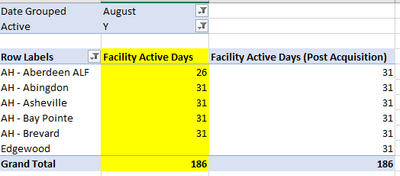
the results display correctly when using the facilitiy names in the rows and each facility displayes the correct ammount of Unique date, However the grand total simply displays a multiplication of the total rows in the facility region table, times the largest unique count of the date column.
My model is built in SSAS tabular and the below is an excel snip of the result.
The Grand Total for Facility Active Days should have been 150, but it is displaying 186.
Thanks,
Solved! Go to Solution.
@SimonGoldPPG , Assuming your row label is region, Try like
SUMX(values('Facility Region'[Region]), calculate(COUNTROWS(DISTINCT('Global Daily Census'[CensusDate]))))
@SimonGoldPPG , Assuming your row label is region, Try like
SUMX(values('Facility Region'[Region]), calculate(COUNTROWS(DISTINCT('Global Daily Census'[CensusDate]))))
Adding Calculate worked.
Thanks,
Hi @SimonGoldPPG ,
Please update the formula of measure [Facility Active Days] as below and check if you can get the correct grand total values:
Facility Active Days :=
SUMX (
VALUES ( 'Facility Region'[Facilitiy Name] ),
COUNTROWS ( DISTINCT ( 'Global Daily Census'[CensusDate] ) )
)You can also refer the methods in the following links to resolve it.
Why Your Total Is Incorrect In Power BI - The Key DAX Concept To Understand
Obtaining accurate totals in DAX
Dax for Power BI: Fixing Incorrect Measure Totals
If you still can't get the correct result, please provide some sample data in your model(exclude sensitive data).
Best Regards
Rena
Check out the April 2026 Power BI update to learn about new features.
Sign up to receive a private message when registration opens and key events begin.
If you have recently started exploring Fabric, we'd love to hear how it's going. Your feedback can help with product improvements.
| User | Count |
|---|---|
| 37 | |
| 28 | |
| 28 | |
| 19 | |
| 18 |
| User | Count |
|---|---|
| 69 | |
| 38 | |
| 32 | |
| 28 | |
| 24 |