Get certified for free when you join Fabric Data Days 2026 and dive into Fabric, Power BI, SQL, AI, and other essential data skills.
Join nowData Days is here! Join us now for 60+ days of learning, challenges, and connection. Learn more
Hi everyone!
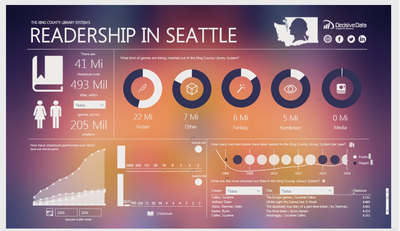
I was checking the Data Stories Gallery when I saw the Dashboard below and was wondering if it's possibile to create a gradient background on Power Bi Desktop. I couldn't find the tools to do so ... Any tips?
Credit: jolsby
You can find the Dashboard made by jolsby at http://community.powerbi.com/t5/Data-Stories-Gallery/Readership-in-Seattle-by-Decisive-Data/m-p/2242...
Thanks in advance 🙂
Solved! Go to Solution.
You create the gradient background offline and then place it on the canvas using Insert|Image. Resize to fit the canvas and then select "Move to back". Hope this helps.
Thanks @tjd this will do it.
They should make it possibile to work with colours on Power BI Desktop so we don't have to upload images everytime.
Don't miss out on Data Days, June 15 through August 7. Learn Fabric, Power BI, SQL, AI and more.
Check out the May 2026 Power BI update to learn about new features.
| User | Count |
|---|---|
| 23 | |
| 21 | |
| 20 | |
| 19 | |
| 13 |
| User | Count |
|---|---|
| 58 | |
| 52 | |
| 37 | |
| 31 | |
| 27 |