This time we’re going bigger than ever. Fabric, Power BI, SQL, AI and more. We're covering it all. You won't want to miss it.
Learn moreLevel up your Power BI skills this month - build one visual each week and tell better stories with data! Get started
Hello everybody,
I recently made a connection between Power Bi and Google Analytics. For me the most important data are:
- Pageviews
- Unique pageviews
- New users
- Users
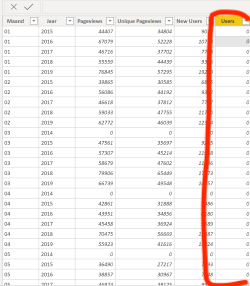
It is not possible to display the number of users per month or per year in Power BI. The other parameters are not a problem. In the appendix I added a screenshot that shows that the number of users does not contain any data. Here is the value 0 everywhere.
The Google Analytics account does contain data for the parameter 'users'.
Does anyone here have experience and know how I can solve this?
Thank you very much in advance!
Greetings,
Mike Mulders
E-mail: m.mulders@knltb.nl
Hi @Anonymous ,
Sort the user column to check again please.
Hi @Anonymous ,
Does that make sense? If so kindly mark my answer as a solution to close the case. Thanks in advance.
Dear Frank,
Unfortunately, that doesn't make any difference. There is no data at all in the 'users' column.
Do you have another solution?
Greetings,
Mike
Check out the April 2026 Power BI update to learn about new features.
Sign up to receive a private message when registration opens and key events begin.
If you have recently started exploring Fabric, we'd love to hear how it's going. Your feedback can help with product improvements.
| User | Count |
|---|---|
| 34 | |
| 29 | |
| 29 | |
| 21 | |
| 18 |
| User | Count |
|---|---|
| 69 | |
| 48 | |
| 33 | |
| 24 | |
| 24 |