Get certified for free when you join Fabric Data Days 2026 and dive into Fabric, Power BI, SQL, AI, and other essential data skills.
Join nowJuly 28 - August 9 | Final Round of the Power BI Dataviz World Championships. This is your chance. Learn more
Hi
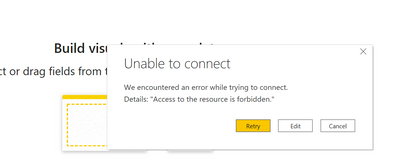
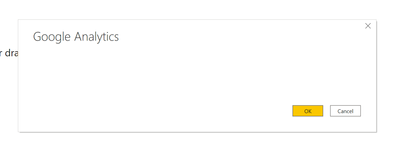
Im trying to connect to Google Analytics through PowerBi. The Get Data option gives me the below errors.
Can you help?
Solved! Go to Solution.
Hi @mohsenask ,
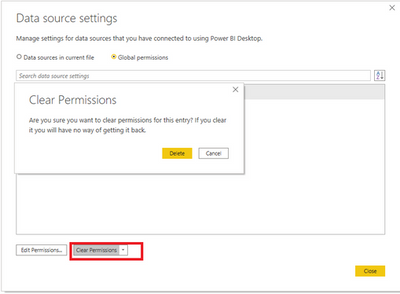
Please make sure you have permission to the data source and you can clear the permission in Data source settings and try it again.
And you can refer the following Microsoft documents and cases that could also help you:
Best Regards,
Lucien Wang
If this post helps then please consider Accept it as the solution to help the other members find it more quickly.
Hi @mohsenask ,
Please make sure you have permission to the data source and you can clear the permission in Data source settings and try it again.
And you can refer the following Microsoft documents and cases that could also help you:
Best Regards,
Lucien Wang
If this post helps then please consider Accept it as the solution to help the other members find it more quickly.
I'm not sure how to solve the connection, but this thread which talks about the accuracy of Google Analytics data might be worth a read:
https://community.powerbi.com/t5/Desktop/Data-from-Google-Analytics-Doesn-t-Match/m-p/133680#M57135
Proud to be a Super User!
Paul on Linkedin.
Hi @mohsenask
Please provide more details. Please show your query code.
regards
Phil
Proud to be a Super User!
There is no query yet. Im just trying to connect to the Google Analytics service using the Get Data option in PowerBi
@PhilipTreacy There is no query yet. Im just trying to connect to the Google Analytics service using the Get Data option in PowerBi
Join us in Barcelona for FabCon and SQLCon, the Fabric, Power BI, SQL, and AI community event. Save €200 with code FABCMTY200.
If you love stickers, then you will definitely want to check out our community sticker challenge, Barcelona edition!
Check out the July 2026 Power BI update to learn about new features.
| User | Count |
|---|---|
| 30 | |
| 28 | |
| 25 | |
| 24 | |
| 16 |
| User | Count |
|---|---|
| 48 | |
| 32 | |
| 17 | |
| 16 | |
| 16 |