cancel
Showing results for 
Search instead for 
Did you mean: 

The Power BI Data Visualization World Championships is back! Get ahead of the game and start preparing now! Learn more

Reply
miquelmartorell
Advocate III
Advocate III

Google Analytics GA4 Connector Fails to connect

Google Analytics GA4 Connector 2.0 (beta) fails to connect in April 2024 version 2.128.1380.0 Power BI Desktop.

"Details: "The 'accounts' field of the registry was not found"."

miquelmartorell_0-1715070769071.png

Here is the error:

miquelmartorell_1-1715070803860.pngmiquelmartorell_2-1715070821051.png

miquelmartorell_3-1715070846643.png


1 ACCEPTED SOLUTION
Anonymous
Not applicable

Hi,@miquelmartorell 

Regarding the issue you raised, my solution is as follows:

My solution to the issue you have raised is as follows:

1.Based on the error message you provided, it is likely that there is an authentication issue, so try checking the connector configuration: Make sure that the Google Analytics GA4 connector is properly configured in Power BI.

You can click "editar" in the error message you provided to verify that you correctly specified all required fields when establishing the connection, especially the "Account" field in the error message you provided.

2.you can also try returning to an older version of GA if the issue is still not resolved. To the best of my knowledge, Google Analytics has two V4 APIs: V4 Reporting and V4 Data.Power BI does not currently support GA4 Data, but does support GA4 Reporting. Please confirm that it will meet your needs after using this approach.

3.Below is the relevant documentation:

Power Query Google Analytics connector - Power Query | Microsoft Learn

Set up your Google Analytics connection - Microsoft Fabric | Microsoft Learn

Best Regards,

Leroy Lu

If this post helps, then please consider Accept it as the solution to help the other members find it more quickly.

View solution in original post

3 REPLIES 3
CoderZen08
Helper V
Helper V

Hi @miquelmartorell Were you able to find a solution? As a workaround, maybe you can try to test your connection with a 3rd party tool. I've tried windsor.ai, supermetrics and funnel.io. I stayed with Windsor because it is much cheaper so just to let you know other options. In case you wonder, to make the connection first search for the GA4 connector in the data sources list:


GA4-1.png


After that, just grant access to your GA4 account using your credentials, then on preview and destination page you will see a preview of your GA4 fields:


GA4-2.png


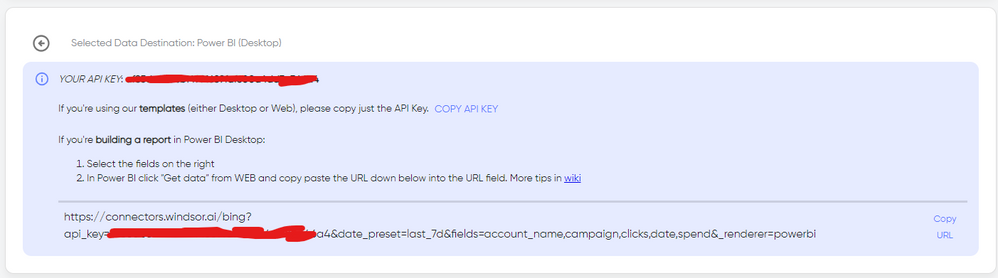
There just select the fields you need. Finally, just select PBI as your data destination and finally just copy and paste the url on PBI --> Get Data --> Web --> Paste the url. 


SELECT_DESTINATION_NEW.png

Good morning @CoderZen08


Native connector GA4 works fine 😉


Thank you.

Anonymous
Not applicable

Hi,@miquelmartorell 

Regarding the issue you raised, my solution is as follows:

My solution to the issue you have raised is as follows:

1.Based on the error message you provided, it is likely that there is an authentication issue, so try checking the connector configuration: Make sure that the Google Analytics GA4 connector is properly configured in Power BI.

You can click "editar" in the error message you provided to verify that you correctly specified all required fields when establishing the connection, especially the "Account" field in the error message you provided.

2.you can also try returning to an older version of GA if the issue is still not resolved. To the best of my knowledge, Google Analytics has two V4 APIs: V4 Reporting and V4 Data.Power BI does not currently support GA4 Data, but does support GA4 Reporting. Please confirm that it will meet your needs after using this approach.

3.Below is the relevant documentation:

Power Query Google Analytics connector - Power Query | Microsoft Learn

Set up your Google Analytics connection - Microsoft Fabric | Microsoft Learn

Best Regards,

Leroy Lu

If this post helps, then please consider Accept it as the solution to help the other members find it more quickly.

Helpful resources

Announcements
Power BI DataViz World Championships

Power BI Dataviz World Championships

The Power BI Data Visualization World Championships is back! Get ahead of the game and start preparing now!

December 2025 Power BI Update Carousel

Power BI Monthly Update - December 2025

Check out the December 2025 Power BI Holiday Recap!

FabCon Atlanta 2026 carousel

FabCon Atlanta 2026

Join us at FabCon Atlanta, March 16-20, for the ultimate Fabric, Power BI, AI and SQL community-led event. Save $200 with code FABCOMM.