cancel
Showing results for 
Search instead for 
Did you mean: 

The Power BI Data Visualization World Championships is back! Get ahead of the game and start preparing now! Learn more

Reply
Sohrab
Advocate II
Advocate II

Google Analytics Connector Throws Error on Sign In

Hi,


In troubleshooting an issue on a report deployed to the service that has suddenly started throwing errors, we think we have found the cause to be in a query that uses the Google Analytics connector.  To isolate the issue, we created a new blank report, selected the Google Analytics connector as our only data source, and on first trying to Sign In from Power BI Desktop, but before any credentials are entered (i.e., after clicking Connect) we get error "Something went wrong. Access is denied"


Power BI Desktop Version: 2.97.861.0 64-bit (September 2021)


Google Analytics Something Went WrongGoogle Analytics Something Went Wrong


Is anyone experiencing this?

Thanks!


4 REPLIES 4
ReportMaster
Post Partisan
Post Partisan

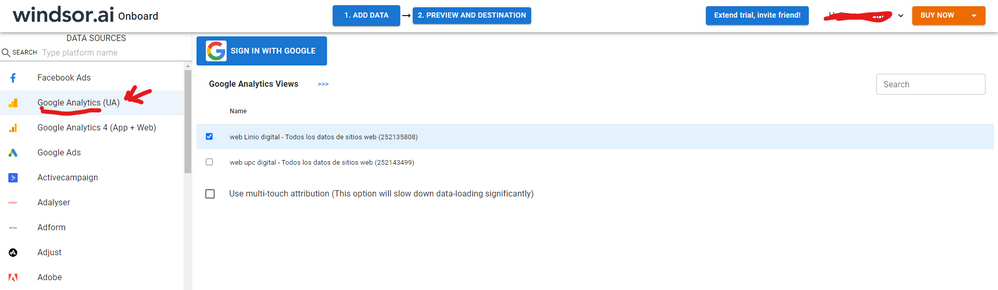
Hi @Sohrab I know this reply is very late lol but were you able to find a solution? As a workaround, maybe you can try to test your connection with a 3rd party connector. I've tried windsor.ai, supemetrics and funnel.io. I stayed with windsor because it is much cheaper so just to let you know other options. In case you wonder, to make the connection first search for the GA connector in the data sources list:


GA-1.png


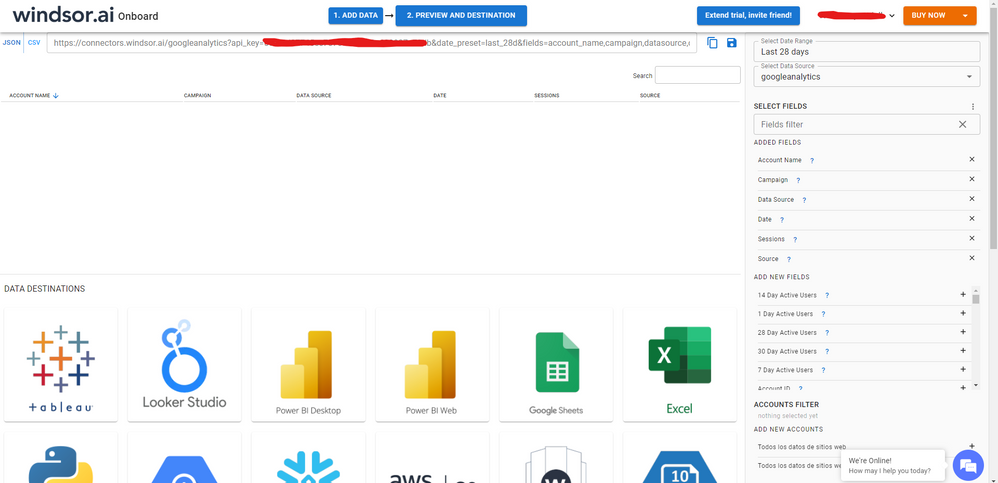
After that, just grant access to your GA account using your credentials, then on preview and destination page you will see a preview of your GA fields:


GA-2.png


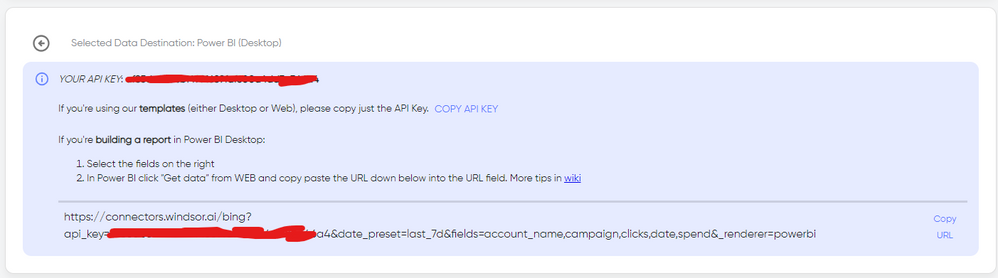
There just select the fields you need. Finally, just select PBI as your data destination and finally just copy and paste the url on PBI --> Get Data --> Web --> Paste the url.


SELECT_DESTINATION_NEW.png

v-jingzhang
Community Support
Community Support

Hi @Sohrab 


Currently Power BI Desktop uses the default web browser on your machine for signing in to third-party services. (In the past, it used IE for signing in.) If you have signing in error in Power BI Desktop on a specific machine, please check which browser is set up as the default web browser application. Try clearing cache/stored credentials in this web browser and signing in again. I guess maybe your web browser already has a google account logged in which doesn't have access to Google Analytics service. 


Additionally, there is a new update for Google Analytics connector in the latest Power BI October 2021 version. You may update the application to experience the new feature! See Power BI October 2021 Feature Summary 


Best Regards,
Community Support Team _ Jing
If this post helps, please Accept it as Solution to help other members find it.

amitchandak
Super User
Super User

@Sohrab , clear permission and try again


Check for recent issues at - https://community.powerbi.com/t5/Issues/idb-p/Issues

If needed log a new one

Share with Power BI Enthusiasts: Full Power BI Video (20 Hours) YouTube
Microsoft Fabric Series 60+ Videos YouTube
Microsoft Fabric Hindi End to End YouTube

@amitchandak thanks - we did try that with no effect. Confirmed that Power BI does not list GA connector under Data source settings -> Global permissions.


However, this error appears to be machine dependant.  I suspect something to do with the browser that Power BI Desktop is trying to "hand off" the authentication to. On another machine, following the same steps, Chrome opens and takes the user to a Google authentication page.

Helpful resources

Announcements
Power BI DataViz World Championships

Power BI Dataviz World Championships

The Power BI Data Visualization World Championships is back! Get ahead of the game and start preparing now!

December 2025 Power BI Update Carousel

Power BI Monthly Update - December 2025

Check out the December 2025 Power BI Holiday Recap!

FabCon Atlanta 2026 carousel

FabCon Atlanta 2026

Join us at FabCon Atlanta, March 16-20, for the ultimate Fabric, Power BI, AI and SQL community-led event. Save $200 with code FABCOMM.