cancel
Showing results for 
Search instead for 
Did you mean: 

Learn from the best! Meet the four finalists headed to the FINALS of the Power BI Dataviz World Championships! Register now

Reply
bensavelli
Frequent Visitor

Google Analytics Connector: Issue with using multiple dimensions

Hi I am trying to pull in a dataset to power bi.


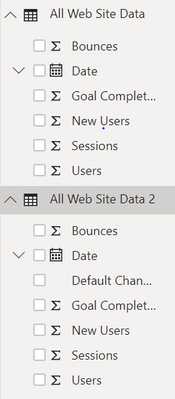
The only way the figures match GA is when I only have one dimension specified.  See below, there's two datasets ulled from GA exactly the same, except the second also has another dimention- channel. However, when the total sessions are summed from both datasets, they give different numbers. Any help would be appreciated, thanks. 

GA Power BI.PNGsessions.PNG

4 REPLIES 4
raymond_zedov
Regular Visitor

Hi,


Curious if you found a solution to this issue? I am having the same problem...

Hi-


Sorry I'm afraid not. I think it's a case of Google not wanting you to be able to do anything useful with their data outside their own platforms. 

dax
Community Support
Community Support

Hi bensavelli,

Did you mean that all data in two dimensions are the same except channel column? And I want to know whether the measures which used to calculate sum are same? In addition you also need to check whether dimension are link to other table which might affect the result.

Best Regards,
Zoe Zhi

If this post helps, then please consider Accept it as the solution to help the other members find it more quickly.

Hi thanks for getting back.


Both datasets include the same metrics, but the second also includes channel. I would expect the data would match, I'm just adding a dimensuion to allow a further breakdown. However, the data is different.


The measures used to calculate sum are both a sum of sessions.


There are no links to other tables.

Helpful resources

Announcements
Power BI DataViz World Championships carousel

Power BI DataViz World Championships - June 2026

A new Power BI DataViz World Championship is coming this June! Don't miss out on submitting your entry.

Join our Fabric User Panel

Join our Fabric User Panel

Share feedback directly with Fabric product managers, participate in targeted research studies and influence the Fabric roadmap.

March Power BI Update Carousel

Power BI Community Update - March 2026

Check out the March 2026 Power BI update to learn about new features.