cancel
Showing results for 
Search instead for 
Did you mean: 

The Power BI Data Visualization World Championships is back! Get ahead of the game and start preparing now! Learn more

Reply
Berl21
Helper III
Helper III

Google Analytics Connectior Beta (2.0) - error when looking for user data starting 2022

Hi,


thanks for providing the new connector, I am looking forward to using it a lot.


There is an issue with the date column. I am aiming to make an easy visual, showing the KPI total users by year and month. But no data is showing up for 2022 and 2023 (there is data in the account). I guess it has to do with the number of rows used while pulling the date field:/


I also tried to put a filter directly on the date column to see results only after the 1st of January 2022, but got an error message.

code=400
message=Invalid JSON payload received. Message too deep. Max recursion depth reached for key ''
status=INVALID_ARGUMENT


Is bug known? What can I do to go around it?


Thanks,


Pauline.

3 REPLIES 3
clukaych
Frequent Visitor

I am having the same issue and have discovered a usable workaround until a more permanent solution is implemented, though it won't apply to all use cases.


You can pull by 'date' and 'year' and then filter only by 'year' and it won't throw an error. That should give the desired granularity and, once combined that with some creative filtering (either 'begins with' or converting to a number then filtering), you can get it to filter down to a more manageable date range. I ended up using this step below to get all dates within the past 10 years:


= Table.SelectRows(#"Changed Type", each [year] > (Date.Year(DateTime.Date(DateTime.FixedLocalNow()))-10))
 

Hope that helps!

fricharte
New Member

Hello,
I have the same problem... has anyone been able to solve it without using third party tools?

ReportMaster
Post Partisan
Post Partisan

Hi @Berl21 May be a connector issue. I've used the native connector but I had issues sometimes. As a workaround, maybe you can try to test your connection with a 3rd party tool. I've tried windsor.ai, supemetrics and funnel.io. I stayed with windsor because it is much cheaper so just to let you know other options. In case you wonder, to make the connection first search for the GA4 connector in the data sources list:


GA4-1.png


After that, just grant access to your GA4 account using your credentials, then on preview and destination page you will see a preview of your G4 fields:


GA4-2.png


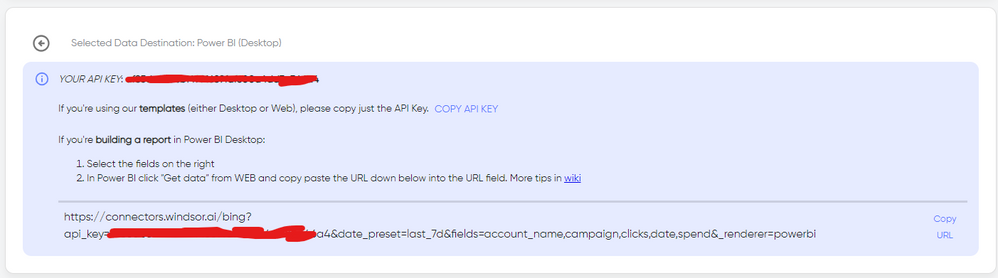
There just select the fields you need. Finally, just select PBI as your data destination and finally just copy and paste the url on PBI --> Get Data --> Web --> Paste the url. 


SELECT_DESTINATION_NEW.png

Helpful resources

Announcements
Power BI DataViz World Championships

Power BI Dataviz World Championships

The Power BI Data Visualization World Championships is back! Get ahead of the game and start preparing now!

December 2025 Power BI Update Carousel

Power BI Monthly Update - December 2025

Check out the December 2025 Power BI Holiday Recap!

FabCon Atlanta 2026 carousel

FabCon Atlanta 2026

Join us at FabCon Atlanta, March 16-20, for the ultimate Fabric, Power BI, AI and SQL community-led event. Save $200 with code FABCOMM.