cancel
Showing results for 
Search instead for 
Did you mean: 

Try your skills in the Power BI Dataviz World Championship! Round one ends June 26. Join now

Reply
ConnieMaldonado
Responsive Resident
Responsive Resident

Global Parameters/Variables Table

Hello - Is there a way to set up a table to include variables that can be accessed in any calculation?  I thought I read that there's a way to do this, but I can't find it now.


For example, I have several tables that have geofencing data for field activities by technicians.  I want to filter all records with onsite duration < 5 minutes.  Currently, I've created a filter for each table, but I'd like to user a global parameter of 5 minutes so I can change the parameter once and have it filter all tables. 


Is there a best practice to do this?


Thanks.

1 ACCEPTED SOLUTION

You can use the numeric range parameter in other measures as well as visuals. It's essentially an interactive measure that allows a user to specify a value via a slider and have that value propagate throughout the report.


Did I answer your question? Mark my post as a solution!

Proud to be a Super User!


View solution in original post

3 REPLIES 3
ConnieMaldonado
Responsive Resident
Responsive Resident

That is awesome.  I was not aware of numeric range parameters.  However, I have many calculations in which I reference the filter (measures), so can I use the numeric range parameter there or only in visuals?  Thanks!

You can use the numeric range parameter in other measures as well as visuals. It's essentially an interactive measure that allows a user to specify a value via a slider and have that value propagate throughout the report.


Did I answer your question? Mark my post as a solution!

Proud to be a Super User!


DataInsights
Super User
Super User

@ConnieMaldonado,


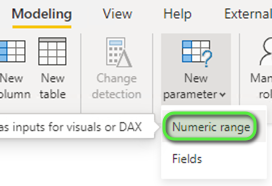
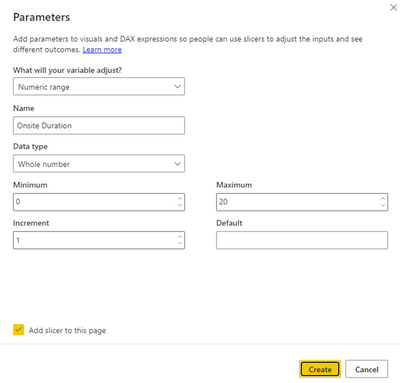
You can achieve this with a numeric range parameter.


1. Create numeric range parameter:


DataInsights_0-1660223164567.png


DataInsights_1-1660223185952.png


2. Create measure:


Onsite Duration Filter = IF ( MAX ( Fact[Onsite Duration] ) < 'Onsite Duration'[Onsite Duration Value], 1 )


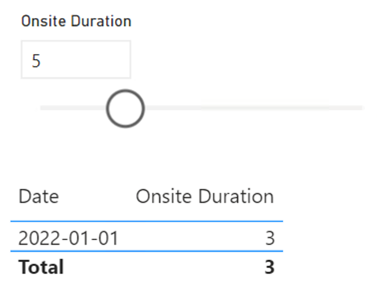
3. Add measure Onsite Duration Filter to a visual:


DataInsights_2-1660223319556.png


4. Result:


DataInsights_3-1660223369580.png

-----


DataInsights_4-1660223390210.png


Did I answer your question? Mark my post as a solution!

Proud to be a Super User!


Helpful resources

Announcements
Fabric Data Days is here Carousel

Data Days 2026

Don't miss out on Data Days, June 15 through August 7. Learn Fabric, Power BI, SQL, AI and more.

May Power BI Update Carousel

Power BI Monthly Update - May 2026

Check out the May 2026 Power BI update to learn about new features.

Power BI DataViz World Championships carousel

Power BI DataViz World Championships - June 2026

A new Power BI DataViz World Championship is coming this June! Don't miss out on submitting your entry.