FabCon is coming to Atlanta
Join us at FabCon Atlanta from March 16 - 20, 2026, for the ultimate Fabric, Power BI, AI and SQL community-led event. Save $200 with code FABCOMM.
Register now!- Power BI forums
- Get Help with Power BI
- Desktop
- Service
- Report Server
- Power Query
- Mobile Apps
- Developer
- DAX Commands and Tips
- Custom Visuals Development Discussion
- Health and Life Sciences
- Power BI Spanish forums
- Translated Spanish Desktop
- Training and Consulting
- Instructor Led Training
- Dashboard in a Day for Women, by Women
- Galleries
- Data Stories Gallery
- Themes Gallery
- Contests Gallery
- QuickViz Gallery
- Quick Measures Gallery
- Visual Calculations Gallery
- Notebook Gallery
- Translytical Task Flow Gallery
- TMDL Gallery
- R Script Showcase
- Webinars and Video Gallery
- Ideas
- Custom Visuals Ideas (read-only)
- Issues
- Issues
- Events
- Upcoming Events
The Power BI Data Visualization World Championships is back! Get ahead of the game and start preparing now! Learn more
- Power BI forums
- Forums
- Get Help with Power BI
- Desktop
- Re: Giving Index Number
- Subscribe to RSS Feed
- Mark Topic as New
- Mark Topic as Read
- Float this Topic for Current User
- Bookmark
- Subscribe
- Printer Friendly Page


- Mark as New
- Bookmark
- Subscribe
- Mute
- Subscribe to RSS Feed
- Permalink
- Report Inappropriate Content
Giving Index Number
Hi The most powerful ad helper community 🙂
i need your kind supports to create a column.let me explain what i need pls :
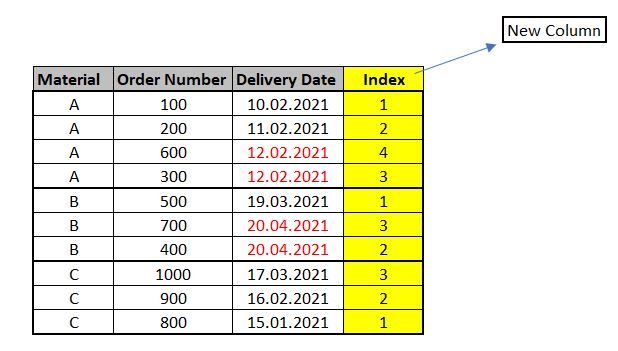
I have table as below , wtih the named columns : "material" , "Order Number " , "Delivery Date " . I would like to give index numbers for each rows. So i wouldl like to create a new column as i marked yellow as below sample table . But every each material will have its own group for index number .Every each material will start from 1 for index .
Rules will be like that :
- System will check delivery date , which row's delivery date is earlier that row will have priority , earliest delivery date row will take index number 1. If the delivery date will be same for some rows , then system will check order number and which order number is smaller this row will have priority.The main check is about delivery time earlier or not , then if there is same delivery date then second check will be on order number.
- As you see in below table Material A,B,C are starting for index number 1 , all each materials have their own index group.
- Also for Material A and for Material B there are rows which are same delivery date .So here system made second check , ad checked the order numbers , which order number is smaller system gave priority to this row for index number .(i marked with red the dates that have this issue)
Source : https://drive.google.com/file/d/1fj8NFM5nnt_frWy1kaRG8gPw79NjX_PU/view?usp=sharing
I hope it is clear dears , also i am sharing with you excel source to make your job easier .
thanks in advance for your kind supports dears
Solved! Go to Solution.

- Mark as New
- Bookmark
- Subscribe
- Mute
- Subscribe to RSS Feed
- Permalink
- Report Inappropriate Content
The solution I posted was for measures, not new calculated columns in the data table.
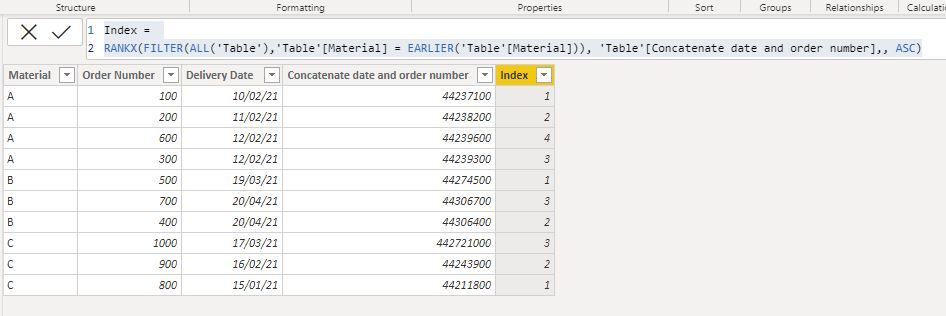
If you want to add these columns to the actual data table, you need:
1) New column concatenating date and order number
Concatenate date and order number = INT(INT('Table'[Delivery Date ]) & 'Table'[Order Number])
2) New column for the index:
Index =
RANKX (
    FILTER ( ALL ( 'Table' ), 'Table'[Material] = EARLIER ( 'Table'[Material] ) ),
    'Table'[Concatenate date and order number],
    ,
    ASC
)
and you get this:
Did I answer your question? Mark my post as a solution!
In doing so, you are also helping me. Thank you!
Proud to be a Super User!
Paul on Linkedin.
- Mark as New
- Bookmark
- Subscribe
- Mute
- Subscribe to RSS Feed
- Permalink
- Report Inappropriate Content
Good point! You can solve it for example by "inflating" the date expression: INT(table[Date]) * 100000000000000 + table[order number]
Did I answer your question? Mark my post as a solution!
In doing so, you are also helping me. Thank you!
Proud to be a Super User!
Paul on Linkedin.
- Mark as New
- Bookmark
- Subscribe
- Mute
- Subscribe to RSS Feed
- Permalink
- Report Inappropriate Content
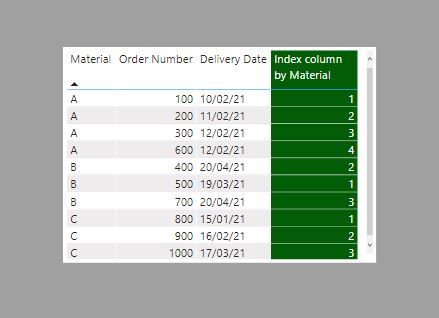
Here is one way.
1) Create a measure concatenating date (converted into an integer) and order number, making the result an integer:
sort by =
INT ( INT ( MAX ( 'Table'[Delivery Date ] ) ) & [Sum order number] )
2) create the index using RANKX on this [sort by] measure:
Index column by Material =
RANKX (
    FILTER (
        ALLEXCEPT ( 'Table', 'Table'[Material] ),
        NOT ( ISBLANK ( [sort by] ) )
    ),
    [sort by],
    ,
    ASC
)
and you get this result
Did I answer your question? Mark my post as a solution!
In doing so, you are also helping me. Thank you!
Proud to be a Super User!
Paul on Linkedin.
- Mark as New
- Bookmark
- Subscribe
- Mute
- Subscribe to RSS Feed
- Permalink
- Report Inappropriate Content
Dear @PaulDBrown ;
thank you very much ,
sort measure gave error so i coreccted as below , am i right ?

- Mark as New
- Bookmark
- Subscribe
- Mute
- Subscribe to RSS Feed
- Permalink
- Report Inappropriate Content
The solution I posted was for measures, not new calculated columns in the data table.
If you want to add these columns to the actual data table, you need:
1) New column concatenating date and order number
Concatenate date and order number = INT(INT('Table'[Delivery Date ]) & 'Table'[Order Number])
2) New column for the index:
Index =
RANKX (
    FILTER ( ALL ( 'Table' ), 'Table'[Material] = EARLIER ( 'Table'[Material] ) ),
    'Table'[Concatenate date and order number],
    ,
    ASC
)
and you get this:
Did I answer your question? Mark my post as a solution!
In doing so, you are also helping me. Thank you!
Proud to be a Super User!
Paul on Linkedin.
- Mark as New
- Bookmark
- Subscribe
- Mute
- Subscribe to RSS Feed
- Permalink
- Report Inappropriate Content
dear @PaulDBrown ;
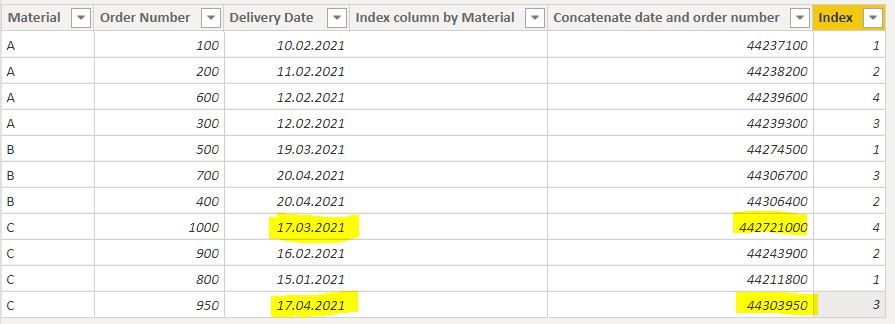
i noticed that when order number starts to be 4 digit , index calculating is working wrongly, as you see for below picture material C even has April delivery date index number coming=3
the reason is ; order umber "1000" because of being 4 digit making concateate column very big number
can we solve this issue ?
- Mark as New
- Bookmark
- Subscribe
- Mute
- Subscribe to RSS Feed
- Permalink
- Report Inappropriate Content
Good point! You can solve it for example by "inflating" the date expression: INT(table[Date]) * 100000000000000 + table[order number]
Did I answer your question? Mark my post as a solution!
In doing so, you are also helping me. Thank you!
Proud to be a Super User!
Paul on Linkedin.
- Mark as New
- Bookmark
- Subscribe
- Mute
- Subscribe to RSS Feed
- Permalink
- Report Inappropriate Content
- Mark as New
- Bookmark
- Subscribe
- Mute
- Subscribe to RSS Feed
- Permalink
- Report Inappropriate Content
@erhan_79
nobody's perfect! But thank you for the compliment!
Happy to have helped!
Did I answer your question? Mark my post as a solution!
In doing so, you are also helping me. Thank you!
Proud to be a Super User!
Paul on Linkedin.
- Mark as New
- Bookmark
- Subscribe
- Mute
- Subscribe to RSS Feed
- Permalink
- Report Inappropriate Content


- Mark as New
- Bookmark
- Subscribe
- Mute
- Subscribe to RSS Feed
- Permalink
- Report Inappropriate Content
Hi @erhan_79 ,
below you will find a great blog post from Raza Rad, explains exactly how to do what you are trying to accomplish
https://radacad.com/create-row-number-for-each-group-in-power-bi-using-power-query
Thanks,
I hope this helps,
Richard
Did I answer your question? Mark my post as a solution! Kudos Appreciated!
Proud to be a Super User!
- Mark as New
- Bookmark
- Subscribe
- Mute
- Subscribe to RSS Feed
- Permalink
- Report Inappropriate Content
Dear @richbenmintz
thanks for your support but i can not use Query side because this table is referenced from a live connection.I need a dax formula to create a column on power bı desktop .your quide is tellinng about query solving.Is ıt possible thet you ca share with me DAX formula ?

Helpful resources

Power BI Dataviz World Championships
The Power BI Data Visualization World Championships is back! Get ahead of the game and start preparing now!

Power BI Monthly Update - December 2025
Check out the December 2025 Power BI Holiday Recap!

FabCon Atlanta 2026
Join us at FabCon Atlanta, March 16-20, for the ultimate Fabric, Power BI, AI and SQL community-led event. Save $200 with code FABCOMM.

| User | Count |
|---|---|
| 39 | |
| 38 | |
| 36 | |
| 28 | |
| 28 |


| User | Count |
|---|---|
| 124 | |
| 88 | |
| 74 | |
| 66 | |
| 65 |


