
Join us at FabCon Atlanta from March 16 - 20, 2026, for the ultimate Fabric, Power BI, AI and SQL community-led event. Save $200 with code FABCOMM.
Register now!The Power BI Data Visualization World Championships is back! Get ahead of the game and start preparing now! Learn more
Hi,
I am struggling in getting the latest row and I researched several topics but no luck of getting the correct formula.
I would like to check how to the last row value of the table below.
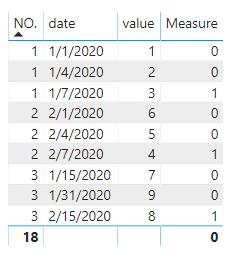
I have a ledger entry like this.
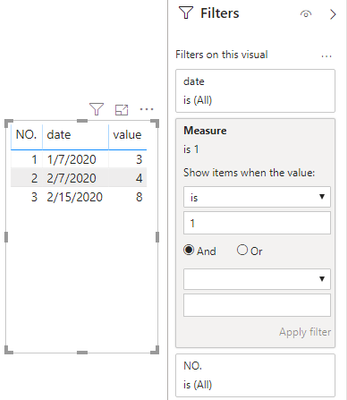
1st screen shot this is multiple entries and I want to get the final data which is the 2nd screenshot.
I think this is easy but for some reasons I could not figure out.
I appreciate your help.
Solved! Go to Solution.
Hi @Anonymous ,
Create a mesure like below and add it to visual filter.
Measure =
var maxdate = CALCULATE(MAX('Table'[date]),FILTER(ALLSELECTED('Table'),'Table'[NO.]=MAX('Table'[NO.])))
return
IF(SELECTEDVALUE('Table'[date])=maxdate,1,0)
Best Regards,
Jay
Community Support Team _ Jay Wang
If this post helps, then please consider Accept it as the solution to help the other members find it more quickly.
Hi @Anonymous ,
Create a mesure like below and add it to visual filter.
Measure =
var maxdate = CALCULATE(MAX('Table'[date]),FILTER(ALLSELECTED('Table'),'Table'[NO.]=MAX('Table'[NO.])))
return
IF(SELECTEDVALUE('Table'[date])=maxdate,1,0)
Best Regards,
Jay
Community Support Team _ Jay Wang
If this post helps, then please consider Accept it as the solution to help the other members find it more quickly.
Thank you. I was able to figure out this.
Richelle
The Power BI Data Visualization World Championships is back! Get ahead of the game and start preparing now!
| User | Count |
|---|---|
| 39 | |
| 38 | |
| 38 | |
| 28 | |
| 27 |
| User | Count |
|---|---|
| 124 | |
| 88 | |
| 73 | |
| 66 | |
| 65 |