This time we’re going bigger than ever. Fabric, Power BI, SQL, AI and more. We're covering it all. You won't want to miss it.
Learn moreLevel up your Power BI skills this month - build one visual each week and tell better stories with data! Get started
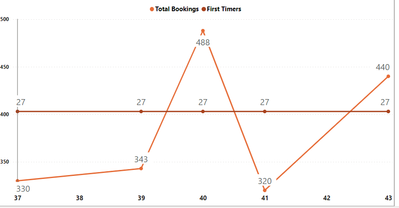
Hello, I have one measure with no error but showing only one value for all the weeks. Here is the DAX code and the output for reference.
first_timers = CALCULATE(
COUNT('Survey data'[First Time]),'Survey data'[First Time] = "yes")
Hi @Parul_verma
Thanks for reaching out to us.
I just want to confirm if you resolved this issue? If yes, you can accept the answer helpful as the solution or share you method and accept it as solution, thanks for your contribution to improve Power BI.
If you need more help, please let me know.
Best Regards,
Community Support Team _Tang
If this post helps, please consider Accept it as the solution to help the other members find it more quickly.
Hi @Parul_verma !
Is there a relationship between 'Survey Data' table and the table where you are taking the weeks/months field? If not, you should create one in order for your measure to be filtered by the given field.
Let me know if that helps!
Whats the field you are using on the x-axis?
Check out the April 2026 Power BI update to learn about new features.
Sign up to receive a private message when registration opens and key events begin.
If you have recently started exploring Fabric, we'd love to hear how it's going. Your feedback can help with product improvements.
| User | Count |
|---|---|
| 30 | |
| 24 | |
| 23 | |
| 17 | |
| 15 |
| User | Count |
|---|---|
| 63 | |
| 36 | |
| 30 | |
| 23 | |
| 22 |