Join us at FabCon Atlanta from March 16 - 20, 2026, for the ultimate Fabric, Power BI, AI and SQL community-led event. Save $200 with code FABCOMM.
Register now!The Power BI Data Visualization World Championships is back! Get ahead of the game and start preparing now! Learn more
Hello,
I am trying to retrive the previous value of a row, using the knowledge I read from other posts about this topic.
But, the data I get is incorrect. I dont understand why.
My table name is Data, and it has the following columns:
- I for Index. Running number (1,2,3,...)
- Number of sales
I want to calculate: Number of sales [I] - Number of sales [I-1], for each row
This is the dax I am using:
Solved! Go to Solution.
Hi @Justiy ,
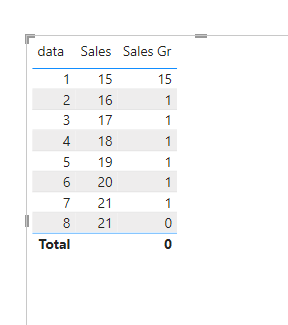
I have created a simple sample, please refer to it to see if it helps you.
Create a measure.
Sales Gr =
VAR Cur_Index =
MAX ( Data[data] )
VAR Pre_Index = Cur_Index - 1
VAR Pre_Value =
CALCULATE (
MAX ( Data[Sales] ),
FILTER ( ALL ( Data ), Data[data] = Pre_Index )
)
VAR Cur_Value =
CALCULATE (
MAX ( Data[Sales] ),
FILTER ( ALL ( Data ), Data[data] = Cur_Index )
)
RETURN
Cur_Value - Pre_Value
If I have misunderstood your meaning, please provide more details with your desired output and pbix file without priavcy information.
Best Regards
Community Support Team _ Polly
If this post helps, then please consider Accept it as the solution to help the other members find it more quickly.
Hi,
Share some data to work with. Do you have a Date column in your dataset? Do you want a calculated column or a mesure solution?
Hi @Justiy ,
I have created a simple sample, please refer to it to see if it helps you.
Create a measure.
Sales Gr =
VAR Cur_Index =
MAX ( Data[data] )
VAR Pre_Index = Cur_Index - 1
VAR Pre_Value =
CALCULATE (
MAX ( Data[Sales] ),
FILTER ( ALL ( Data ), Data[data] = Pre_Index )
)
VAR Cur_Value =
CALCULATE (
MAX ( Data[Sales] ),
FILTER ( ALL ( Data ), Data[data] = Cur_Index )
)
RETURN
Cur_Value - Pre_Value
If I have misunderstood your meaning, please provide more details with your desired output and pbix file without priavcy information.
Best Regards
Community Support Team _ Polly
If this post helps, then please consider Accept it as the solution to help the other members find it more quickly.
Yes it works. Thanks.
My problem was that I needed to add to my filter - ALL() as you did.
The Power BI Data Visualization World Championships is back! Get ahead of the game and start preparing now!
| User | Count |
|---|---|
| 40 | |
| 36 | |
| 33 | |
| 29 | |
| 26 |
| User | Count |
|---|---|
| 135 | |
| 103 | |
| 65 | |
| 61 | |
| 55 |