Get certified for free when you join Fabric Data Days 2026 and dive into Fabric, Power BI, SQL, AI, and other essential data skills.
Join nowJuly 28 - August 9 | Final Round of the Power BI Dataviz World Championships. This is your chance. Learn more
Hello,
I am trying to retrive the previous value of a row, using the knowledge I read from other posts about this topic.
But, the data I get is incorrect. I dont understand why.
My table name is Data, and it has the following columns:
- I for Index. Running number (1,2,3,...)
- Number of sales
I want to calculate: Number of sales [I] - Number of sales [I-1], for each row
This is the dax I am using:
Solved! Go to Solution.
Hi @Justiy ,
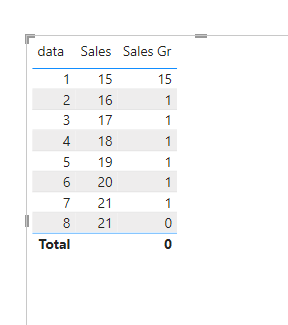
I have created a simple sample, please refer to it to see if it helps you.
Create a measure.
Sales Gr =
VAR Cur_Index =
MAX ( Data[data] )
VAR Pre_Index = Cur_Index - 1
VAR Pre_Value =
CALCULATE (
MAX ( Data[Sales] ),
FILTER ( ALL ( Data ), Data[data] = Pre_Index )
)
VAR Cur_Value =
CALCULATE (
MAX ( Data[Sales] ),
FILTER ( ALL ( Data ), Data[data] = Cur_Index )
)
RETURN
Cur_Value - Pre_Value
If I have misunderstood your meaning, please provide more details with your desired output and pbix file without priavcy information.
Best Regards
Community Support Team _ Polly
If this post helps, then please consider Accept it as the solution to help the other members find it more quickly.
Hi,
Share some data to work with. Do you have a Date column in your dataset? Do you want a calculated column or a mesure solution?
Hi @Justiy ,
I have created a simple sample, please refer to it to see if it helps you.
Create a measure.
Sales Gr =
VAR Cur_Index =
MAX ( Data[data] )
VAR Pre_Index = Cur_Index - 1
VAR Pre_Value =
CALCULATE (
MAX ( Data[Sales] ),
FILTER ( ALL ( Data ), Data[data] = Pre_Index )
)
VAR Cur_Value =
CALCULATE (
MAX ( Data[Sales] ),
FILTER ( ALL ( Data ), Data[data] = Cur_Index )
)
RETURN
Cur_Value - Pre_Value
If I have misunderstood your meaning, please provide more details with your desired output and pbix file without priavcy information.
Best Regards
Community Support Team _ Polly
If this post helps, then please consider Accept it as the solution to help the other members find it more quickly.
Yes it works. Thanks.
My problem was that I needed to add to my filter - ALL() as you did.
Join us in Barcelona for FabCon and SQLCon, the Fabric, Power BI, SQL, and AI community event. Save €200 with code FABCMTY200.
If you love stickers, then you will definitely want to check out our community sticker challenge, Barcelona edition!
Check out the July 2026 Power BI update to learn about new features.
| User | Count |
|---|---|
| 30 | |
| 28 | |
| 25 | |
| 24 | |
| 16 |
| User | Count |
|---|---|
| 48 | |
| 32 | |
| 17 | |
| 16 | |
| 16 |