Get certified for free when you join Fabric Data Days 2026 and dive into Fabric, Power BI, SQL, AI, and other essential data skills.
Join nowTry your skills in the Power BI Dataviz World Championship! Round one ends June 26. Join now
I have a list of around 80.000 customers. I`m trying to rank them based on how often they have purchased. For this I've created a calculated column called Frequency. This is basically just a count of all orders.
What I want to achieve is rank the customers based on this and then put them in equal quartiles based on their ranking. So Q1 has 20.000 customers, Q2 has 20.000 customers etc..
To achieve this I`m following this example: https://community.powerbi.com/t5/Desktop/quartile-ranking/m-p/560850?collapse_discussion=true&filter...
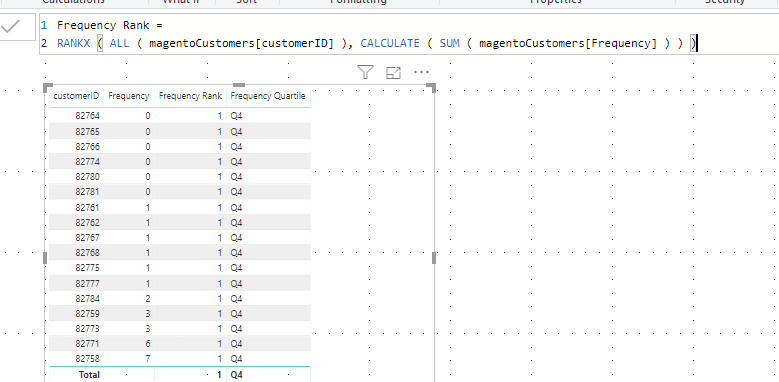
I created a measure called Frequency Rank. And that works fine. But when I use the code to create the quartiles the visual I`m using the Frequency Quartile measure in just keeps loading forever
Frequency Rank = RANKX ( ALL ( magentoCustomers[customerID] ), CALCULATE ( SUM ( magentoCustomers[Frequency] ) ) )
Frequency Quartile =
VAR _table =
SUMMARIZE ( ALL ( magentoCustomers ), magentoCustomers[customerID], "_Rank", [Frequency Rank] )
VAR _table1 =
ADDCOLUMNS ( _table, "_Rank1", RANKX ( _table, [_Rank] ) )
VAR Percentile25 =
PERCENTILEX.EXC ( _table1, [_Rank1], 0.25 )
VAR Percentile50 =
PERCENTILEX.EXC ( _table1, [_Rank1], 0.5 )
VAR Percentile75 =
PERCENTILEX.EXC ( _table1, [_Rank1], 0.75 )
RETURN
IF (
[Frequency Rank] < Percentile25,
"Q1",
IF ( [Frequency Rank] < Percentile50, "Q2", IF ( [Frequency Rank] < Percentile75, "Q3", "Q4" ) )
)Example data set:
Solved! Go to Solution.
Hi @aukev ,
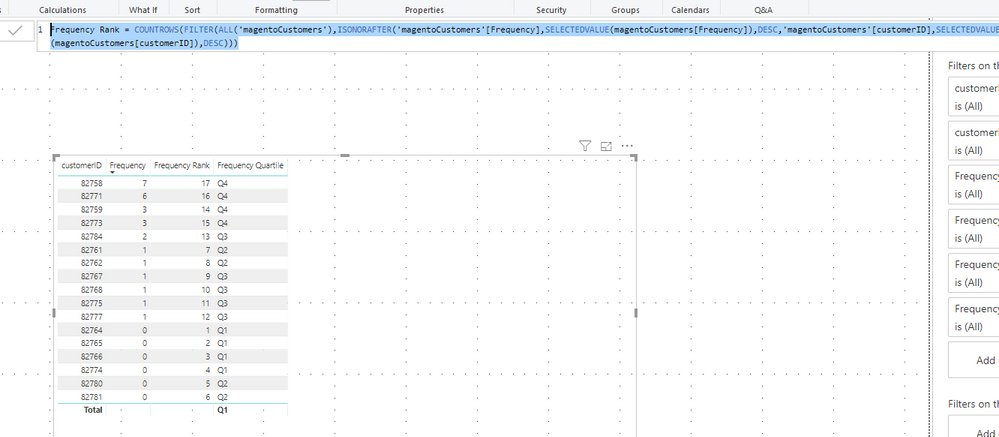
Based on my test, you could use below formula to rank your data:
Frequency Rank = COUNTROWS(FILTER(ALL('magentoCustomers'),ISONORAFTER('magentoCustomers'[Frequency],SELECTEDVALUE(magentoCustomers[Frequency]),DESC,'magentoCustomers'[customerID],SELECTEDVALUE(magentoCustomers[customerID]),DESC)))
Result:
You could also download the pbix file to have a view.
Regards,
Daniel He
Hi @aukev ,
From your measure, I got below result:
What is your desired result? Could you please post it?
Regards,
Daniel He
@v-danhe-msft
The expected result would be this:
| customerID | Frequency | Rank | Quartile |
| 82770 | 7 | 2 | Q4 |
| 82771 | 3 | 4 | Q3 |
| 82773 | 0 | 9 | Q2 |
| 82774 | 11 | 1 | Q4 |
| 82775 | 6 | 3 | Q4 |
| 82776 | 3 | 5 | Q3 |
| 82777 | 0 | 10 | Q1 |
| 82778 | 1 | 7 | Q2 |
| 82779 | 1 | 8 | Q2 |
| 82780 | 0 | 11 | Q1 |
| 82781 | 0 | 12 | Q1 |
| 82782 | 2 | 6 | Q3 |
Hi @aukev ,
Based on my test, you could use below formula to rank your data:
Frequency Rank = COUNTROWS(FILTER(ALL('magentoCustomers'),ISONORAFTER('magentoCustomers'[Frequency],SELECTEDVALUE(magentoCustomers[Frequency]),DESC,'magentoCustomers'[customerID],SELECTEDVALUE(magentoCustomers[customerID]),DESC)))
Result:
You could also download the pbix file to have a view.
Regards,
Daniel He
| User | Count |
|---|---|
| 23 | |
| 21 | |
| 20 | |
| 17 | |
| 11 |
| User | Count |
|---|---|
| 55 | |
| 53 | |
| 43 | |
| 36 | |
| 32 |