Join us at FabCon Atlanta from March 16 - 20, 2026, for the ultimate Fabric, Power BI, AI and SQL community-led event. Save $200 with code FABCOMM.
Register now!The Power BI Data Visualization World Championships is back! It's time to submit your entry. Live now!
Hi All,
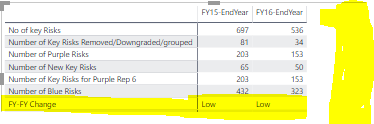
I have 7 calculated columns and need to compare the counts for various years.
I am trying to get the chage value as column but unable to get it .
If I create the Change measure as Column it throws error for SAMEPERIODLASTYEAR which i have used.
Meausres:
Hi @Anonymous ,
Did these FY field measure or column? If column, you can add a measure with if condition to check current row contents to switch measure result of current formula.
Measure =
IF (
ISFILTERED ( Table[FY] ),
CALCULATE (
SUM ( Table[Value] ),
ALLSELECTED ( table ),
VALUES ( Table[Cateogry] )
),
IF ( [No of key Risks] - [Next\Pevious year] > 0, "Low", "Up" )
)
If they are measures, you can direct add three measures to value field and remove column fields.
Regards,
Xiaoxin Sheng
| User | Count |
|---|---|
| 49 | |
| 37 | |
| 33 | |
| 22 | |
| 18 |
| User | Count |
|---|---|
| 132 | |
| 100 | |
| 56 | |
| 37 | |
| 37 |