cancel
Showing results for 
Search instead for 
Did you mean: 

We've captured the moments from FabCon & SQLCon that everyone is talking about, and we are bringing them to the community, live and on-demand. Starts on April 14th. Register now

Reply
gerrymouse1
Frequent Visitor

Getting Wrong Totals With Measure

Folks,


I am totally new to Power BI and I am struggling with my first dashboard


I have 5 columns that have multiple Text Inputs.  I am attempting to count these inputs and display them on chart.  I created a measure that enters a 1 if the correct text is present in the column.  See below


UAPPEHands_GetNum_1 = IF(CONTAINS(SMATAuditData,SMATAuditData[UnsafeAct1CategoryValue], "PPE - Hands"), 1, 0)
 
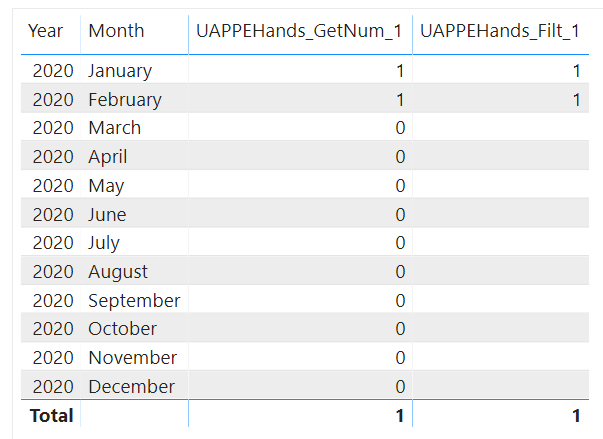
This works perfectly.  However when I attempt to display this on a Chart with a year filter I only ever get 1.  I have checked through all the posts and it is clear it is to do with Filters being applied on the Rows versus the total.  I attempted to create another Measure to remove to resovle this problem but it is not functioning.
 
UAPPEHands_Filt_1 = Var _table = SUMMARIZE(SMATAuditData,SMATAuditData[UnsafeAct1CategoryValue],"__VAR", [UAPPEHands_GetNum_1])
RETURN
IF(HASONEVALUE(SMATAuditData[UnsafeAct1CategoryValue]), [UAPPEHands_GetNum_1], SUMX(_table, [__VAR]))
 
I end up with the data in the table the same without the 0'S
 
Untitled.png
 
Any help really appreciated and ap;o
 
1 ACCEPTED SOLUTION
gerrymouse1
Frequent Visitor

Folks,


Thank you for the input.


I simply went back to the Query, added some Conditional Columns on the Text to get Numeric values.


I then created a measure in PowerBI to add the numbers nad got the correct result when entered into my reports


Thanks for the input and it is a pity I could not resolve with measures only

View solution in original post

5 REPLIES 5
gerrymouse1
Frequent Visitor

Folks,


Thank you for the input.


I simply went back to the Query, added some Conditional Columns on the Text to get Numeric values.


I then created a measure in PowerBI to add the numbers nad got the correct result when entered into my reports


Thanks for the input and it is a pity I could not resolve with measures only

Anonymous
Not applicable

HI @gerrymouse1,

It will help if you share some dummy data to test, it is hard to test without any detail same data.

How to Get Your Question Answered Quickly  

In addition, you can also try to use the following measure formal if it meets for your requirement:

UAPPEHands_Filt_1 =
VAR smaCount =
    COUNTROWS (
        FILTER ( SMATAuditData, SMATAuditData[UnsafeAct1CategoryValue] = "PPE - Hands" )
    )
VAR _table =
    SUMMARIZE (
        SMATAuditData,
        SMATAuditData[UnsafeAct1CategoryValue],
        "count", IF ( smaCount > 0, 1, 0 )
    )
RETURN
    SUMX ( _table, [count] )

Regards,
Xiaoxin Sheng

This did not work either gave me a different result. 

PaulDBrown
Community Champion
Community Champion

@gerrymouse1 


Can you post a screenshot of your model and sample data of the relevant tables? (a test PBIX would be even better!)


Did I answer your question? Mark my post as a solution!
In doing so, you are also helping me. Thank you!

Proud to be a Super User!
Paul on Linkedin.


Anonymous
Not applicable

Hey @gerrymouse1 


Your field it likely set to aggregate by count or distinct count instead of sum. Check out the link below for more information on this: https://docs.microsoft.com/en-us/power-bi/service-aggregates


If this helps please kudo.

If this solves your problem please accept it as a solution.

Helpful resources

Announcements
New to Fabric survey Carousel

New to Fabric Survey

If you have recently started exploring Fabric, we'd love to hear how it's going. Your feedback can help with product improvements.

Power BI DataViz World Championships carousel

Power BI DataViz World Championships - June 2026

A new Power BI DataViz World Championship is coming this June! Don't miss out on submitting your entry.

Join our Fabric User Panel

Join our Fabric User Panel

Share feedback directly with Fabric product managers, participate in targeted research studies and influence the Fabric roadmap.

March Power BI Update Carousel

Power BI Community Update - March 2026

Check out the March 2026 Power BI update to learn about new features.