Share feedback directly with Fabric product managers, participate in targeted research studies and influence the Fabric roadmap.
Sign up nowGet Fabric certified for FREE! Don't miss your chance! Learn more
Hi Team,
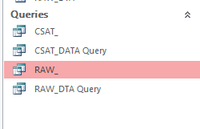
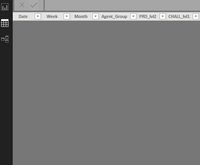
I am trying to get data from access queries, but the powerBi returns blank tables. I am using select queries from access.
Hi @tejasp ,
The Access queries can be seen as a linked server, this may relate with some permission problem, for PowerBI, based on my test, it is still not supported to connect to a linked server, as a workaround, we can import the data to Access before importing the Access file to PowerBI.
Best Regards,
Teige
@TeigeGaothank you for your reply.
My main motive was to avoid creating another table to get the data, I performed more test and found that when I use multi-condition in a query then I am not able to get any data from a Query to PowerBi.
ex.: I can get data in PowerBi, if I did not use And (Group Like 'Agent-*')),
SELECT Year(CHATs.Date) AS [Year], Month(CHATs.Date) AS [Month], sum (CHATs.CHATs_Offered) AS Total_Contacts, Group
FROM CHATs
WHERE ((Year([CHATs].[Date])>='2019') And (Group Like 'Agent-*'))
GROUP BY Year(CHATs.Date), Month(CHATs.Date), Group;
Not sure if there is another way to write it to get in PowerBI.
Share feedback directly with Fabric product managers, participate in targeted research studies and influence the Fabric roadmap.
| User | Count |
|---|---|
| 57 | |
| 53 | |
| 42 | |
| 18 | |
| 14 |
| User | Count |
|---|---|
| 111 | |
| 104 | |
| 36 | |
| 28 | |
| 27 |