cancel
Showing results for 
Search instead for 
Did you mean: 

The Power BI Data Visualization World Championships is back! It's time to submit your entry. Live now!

Reply
Karolina411
Helper V
Helper V

Getting Dates to Match w/o reloading SQL code

Hello
So both my YYYYMM are text so whey do they not align?  They are both text too. Should I create a new date table and link them????

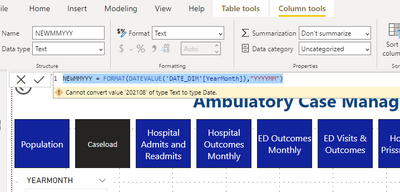
I tried this but it fails: 

Karolina411_0-1683763538987.png


How can I get them to align?  Can a text column be turned into a date column at all? I ask as formatting my SQL will take a long time!

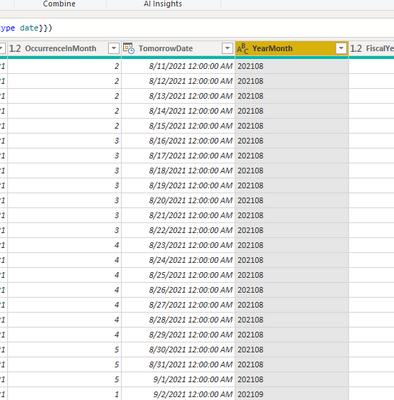
MY DATE TIME:

Karolina411_1-1683763737625.png


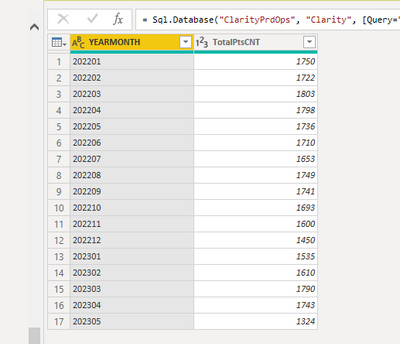
LINKING TO THIS TABLE:

Karolina411_2-1683763793551.png


1 ACCEPTED SOLUTION

I ended up grouping month and date then connecting it to the original date table after making a reference table and it worked like a charm!!  thank you for your reply

View solution in original post

2 REPLIES 2
amitchandak
Super User
Super User

@Karolina411 , Try like

Date(left([Month Year],4), Right([Month Year],2),1)


I have checked in the past too, it does not work great with YYYYMMDD format. You can log an idea for that

Share with Power BI Enthusiasts: Full Power BI Video (20 Hours) YouTube
Microsoft Fabric Series 60+ Videos YouTube
Microsoft Fabric Hindi End to End YouTube

I ended up grouping month and date then connecting it to the original date table after making a reference table and it worked like a charm!!  thank you for your reply

Helpful resources

Announcements
Power BI DataViz World Championships

Power BI Dataviz World Championships

The Power BI Data Visualization World Championships is back! It's time to submit your entry.

January Power BI Update Carousel

Power BI Monthly Update - January 2026

Check out the January 2026 Power BI update to learn about new features.

FabCon Atlanta 2026 carousel

FabCon Atlanta 2026

Join us at FabCon Atlanta, March 16-20, for the ultimate Fabric, Power BI, AI and SQL community-led event. Save $200 with code FABCOMM.